

By Pimlapat PhansuathongPosted: Updated: 12 min read
How To Create A Social Media Strategy In 7 Steps
A social media strategy is a brand's plan for what social media should do for the business. It sets the goal, the job of each platform and the numbers that show whether it works. To create one, set the goal and its measures, study customers and competitors, choose platforms, pick content pillars, set how often to post, plan a calendar and budget, and review the numbers every month.
Key Takeaways
- A social media strategy sets the goal, the job of each platform and the numbers that judge it, while a content calendar lists what goes out, where and on which day.
- In a year of posts on 128 brand Facebook pages in Primal's social media data, the middle page posted about 3 times a week, and pages that posted more got more engagement each week but no more per post.
- Reels beat the account's own average engagement on 21 of 25 brand Instagram accounts in the same data, while on Facebook every format did so on about half the pages or fewer.
- LINE VOOM closed in Thailand on 2026-09-28, so a plan that uses LINE now runs through LINE Official Account broadcasts and LINE Ads.
- Meta's help page says reach includes each person once, even when they saw both a post and an ad, while views include every time the post was displayed.
What A Social Media Strategy Is
A social media strategy is a brand’s plan for what social media should do for the business. It sets out the goal, the job of each platform and the numbers that will show whether the plan works. People also call it a social media marketing plan.
We looked at a year of posts on 128 brand Facebook pages in Primal’s social media data. Pages that posted more often got more engagement each week. Yet engagement per post did not rise or fall with how often a page posted. On Facebook, no format beat the page’s own average on more than about half the pages. So how often a page posts, and in which format, explains little about how a single post does. Spend the team’s time on what each post says and the job it does in the plan.
Decide what each platform is for and how you will judge it, and fill the calendar after that.
How A Strategy Differs From A Content Calendar
The strategy decides why and where a brand posts, and the content calendar decides what goes out and when. A calendar lists each post with its date, platform, topic, format and owner. The strategy changes a few times a year. The calendar changes every month and follows the strategy.
How To Create A Social Media Marketing Plan In 7 Steps
The plan starts with one business goal and ends with a monthly look at the numbers.
- Set one business goal and the key performance indicators (KPIs) that show whether you are reaching it.
- Study your customers and competitors. Find out what customers ask, which platforms they use and what competitors post.
- Choose platforms by the job each one does, such as reaching new people or answering customers who already know you.
- Pick your content pillars, the main topics your brand will post about every month.
- Set how often to post and in which formats, at a pace your team can keep without the posts getting worse.
- Plan a monthly content calendar, and split the budget between regular posts and paid ones.
- Review the numbers every month against where you started, and change the plan where the numbers say so.
How To Set Social Media Goals And KPIs
Start from the business goal, then pick the numbers that show progress towards it. A brand that wants more people to know it watches reach. A brand that sells through chat watches new messages. The table matches common goals to the numbers to watch and where to find them.
| Business goal | Main KPI | Where to find it |
|---|---|---|
| More people know the brand | Reach and views | Insights in Meta Business Suite and TikTok Studio |
| More people take an interest | Engagement rate, shares and saves | The insights for each post |
| More people message or ask for details | New conversations and leads | The inbox in Meta Business Suite and your LINE Official Account chats |
| More people buy | Link clicks and orders from social media | Google Analytics and your online shop |
The number of people who follow a page is a side figure. It says little about whether people saw or cared about your latest posts. In Meta’s insights, look at the net change instead, which is new follows minus unfollows over the same period.
What Reach, Views And Engagement Mean In Meta Insights
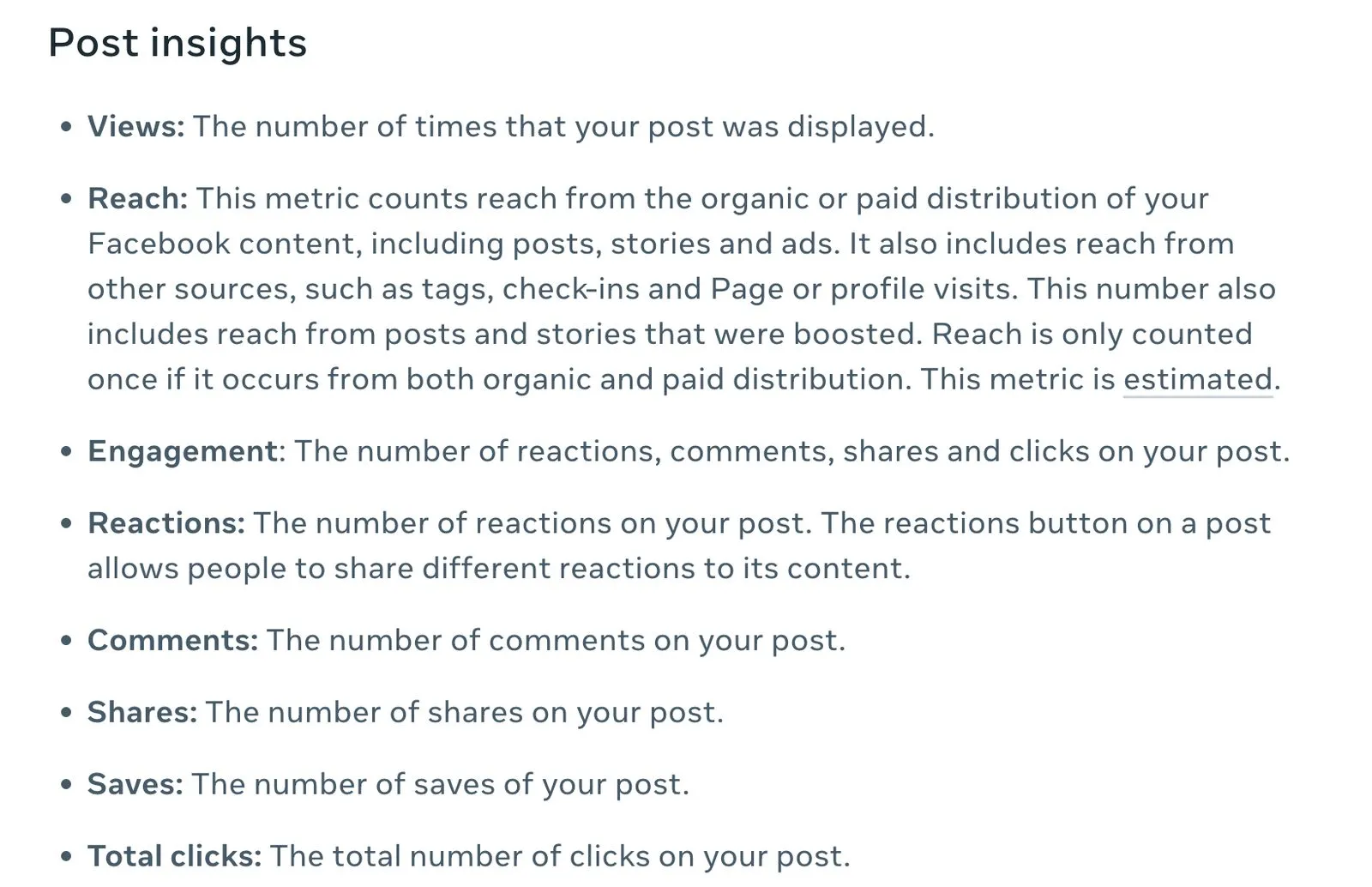
Reach is the number of people who saw your content, and views is the number of times it was displayed. So one person can add many views but only one to reach. Meta’s help page on Page insights says reach covers both organic and paid distribution. A person who saw both appears in reach once.
The figure many teams still call impressions now shows in Meta’s insights as views. The capture below is the post insights part of that page. On a Facebook post, engagement covers reactions, comments, shares and clicks.
How To Calculate Engagement Rate
Engagement rate is engagement divided by reach, times 100. Take a post that reached 8,000 people and got 240 reactions, comments, shares and clicks. Its engagement rate is 3%.
Some tools divide by views or by the people who follow the page instead. Check which base a report uses. Then compare the rate only with your own page’s other posts. Pages in different categories have different normal rates.
How To Research Your Customers And Competitors
Before you choose platforms and topics, find out what customers ask, where they spend time and what competitors post. The quickest source of questions is the team that answers your chats and calls. Ask them for the questions they heard most last month. Each one is a post topic people already want to read.
For competitors, open the pages of 3 to 5 brands your customers compare you with. Note how often each one posts, which formats it uses and which posts get comments or shares. To see the ads a competitor is running now, search for the brand in the Meta Ad Library, which is open to anyone.
What Social Listening Is
Social listening is tracking what people say about your brand, your competitors and your product category on social media and on forums such as Pantip. Teams use it to find repeated questions, complaints that need an answer and topics people are talking about now.
You can start by hand. Search for your brand and product names on each platform once a week. Pay for a social listening tool once there are too many mentions to read yourself.
Which Social Media Platforms To Use In Thailand
Choose platforms by the job each one does in your plan and by how many your team can run every week. We suggest starting with 2 or 3 platforms your customers already use. The table shows the main options in Thailand.
| Platform | Job in the plan | Common formats | Audience in Thailand |
|---|---|---|---|
| Brand information, chat with customers and ads | Photos, albums, Reels and live video | About 52 million | |
| Products and the look of the brand | Reels, photos and carousels | About 21 million | |
| TikTok | Reach new people and help them find products | Short videos and live video | About 57 million aged 18 and over |
| YouTube | Explain products and answer questions that take time | Long videos and Shorts | About 47 million |
| LINE Official Account | Talk to customers who know the brand, and send news and coupons | Chat and broadcasts | LINE has about 56 million users |
| Business to business (B2B) brands and hiring | Posts and articles | About 6.5 million members |
The audience figures come from DataReportal’s Digital 2026 Thailand report, which draws on each platform’s ad tools and on LINE’s own figure. A brand that closes deals in chat can reach new people on Facebook or TikTok. It can then bring interested people into its LINE Official Account to talk. A brand whose product people need to see in use should plan short videos. Our TikTok marketing guide covers them. A business to business brand that hires often can add LinkedIn, and a brand whose buyers have long questions can add YouTube.
LINE VOOM closed in Thailand on 2026-09-28, according to LINE for Business. A plan that used VOOM now uses LINE Official Account broadcasts and LINE Ads instead. Account owners can download their old VOOM posts until 2026-12-31.
What Content Pillars Are And How Many To Use
Content pillars are the main topics a brand posts about every month, and each one does a different job in the plan. We suggest 3 or 4 to start. A small team can then fill every pillar each month, and people learn what the page covers.
The table is a one-month plan for a brand that closes deals in chat. Its Facebook page posts 3 times a week. Only 3 of the 12 posts are offers. The rest answer questions, show the product in use and show the people behind the brand.
| Pillar | Job in the plan | Example topics | Posts a month |
|---|---|---|---|
| Customer questions | Help people understand the product before they decide | Questions the chat team answers every week | 4 |
| Product in use | Show the product working | Demonstrations, before and after | 3 |
| People behind the brand | Show who looks after customers | The team, how the product is made | 2 |
| Offers and events | Get people to message or buy | This month’s promotion, coupons | 3 |
Mark McDowell, who founded Primal, starts a social plan with what makes the brand worth talking about. For a bathroom dehumidifier brand, the first pillar was the hidden problem, so the awareness posts showed mould, damp towels and foggy mirrors. Install stories with a before and after came next, with brand content running alongside. We test different formats and, each month, give more of the work to the format the data shows is doing best. For a new brand, organic posts alone reach few people and do not bring enquiries quickly, so we also set a budget to promote the best posts.
At the end of the month, check which pillar got the highest engagement rate or the most new messages. Give that pillar more posts next month. If a pillar does poorly 2 months running, change its topics or its format.
How Often To Post And Which Formats Work
Post as often as your team can keep up every week without the posts getting worse. In our data, the middle brand Facebook page posted about 3 times a week. Half the pages posted between about 1.5 and 6 times a week.
We looked at every post over 12 months in Primal’s social media data. That covers 128 brand Facebook pages and 27 brand Instagram accounts, 46,372 posts in all. Pages that posted more often got more engagement in total each week. Engagement per post did not rise or fall with how often a page posted. So extra posts add to the weekly total only when each one is as good as the posts before it.
To compare formats fairly, we measured each format’s average engagement against the account’s own average. That way a small page and a large page can be compared. The chart shows the share of accounts where each format beat the account’s average.
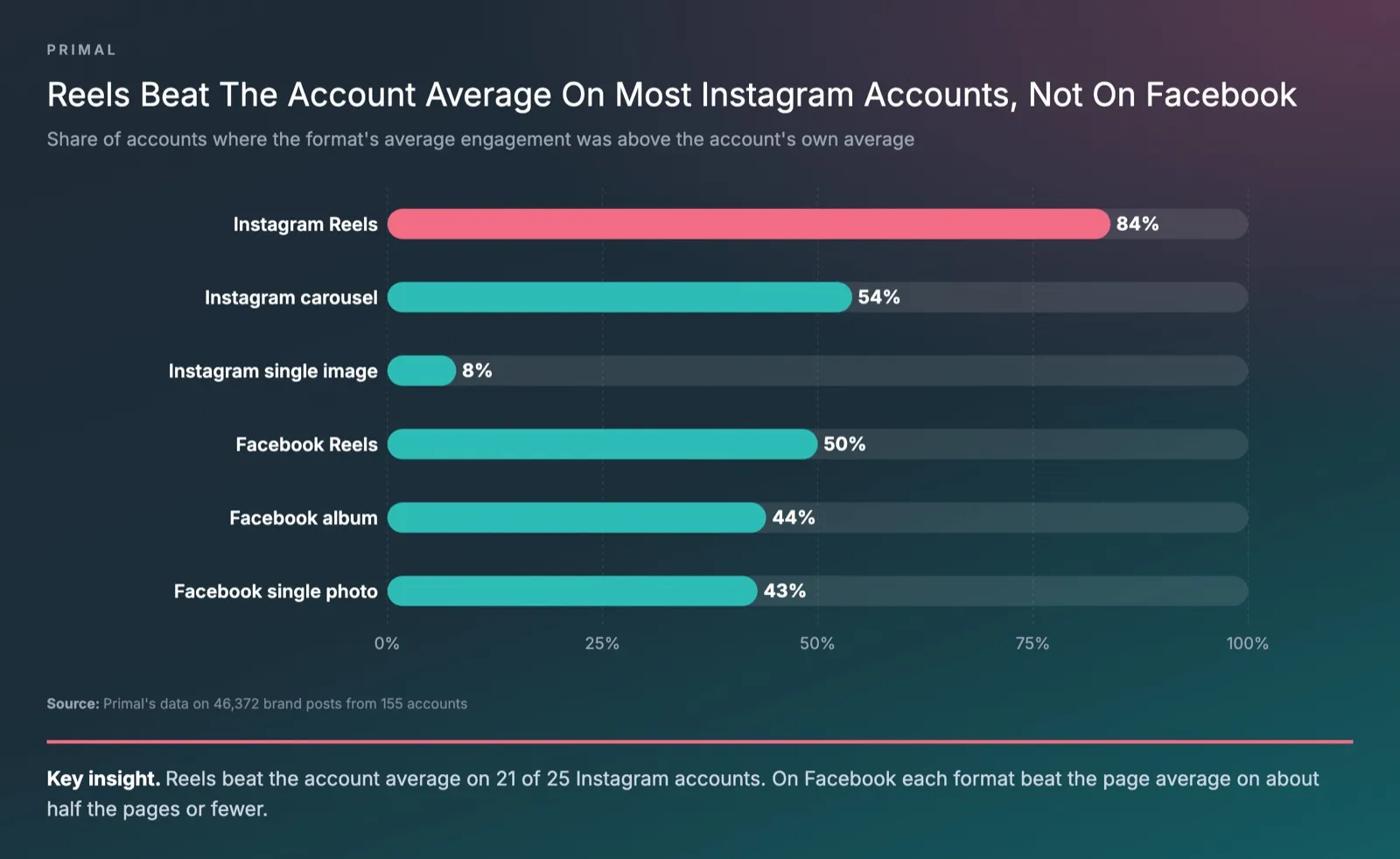
On Instagram, Reels beat the account’s average on 21 of 25 accounts, carousels on 13 of 24 and single images on only 2 of 26. On Facebook, every format beat the page’s average on about half the pages or fewer. Make Reels the main format on Instagram. On Facebook, test formats with your own page’s content and read the insights for each post. These are public figures, so they include posts that were paid to reach more people.
Customers Often Ask Us Whether 20 Or More Posts A Month Is Too Many
It is not too many if each post still gets reach and engagement close to the page’s other posts. In our data, 29 of the 128 Facebook pages posted 7 or more times a week. Check the figures for each post in your insights every month. If reach on newer posts keeps falling, post less and spend the time on the pillars that work.
How To Make A Content Calendar And Schedule Posts
A content calendar is a table of every planned post with its date, platform, pillar, topic, format, owner and approval status. Finish and approve next month’s calendar in the first week of this month. That gives the team about 3 weeks to make the posts before they go out.
A spreadsheet such as Google Sheets works well. Use one row for each post, and put the link to the image or video file in the same row. Whoever approves the post then sees the text, the image and the date in one place.
Schedule Facebook and Instagram posts in Meta Business Suite. Meta’s help page on creating posts says its Active times option recommends posting times. They come from when the people who follow you were most active on Facebook and Instagram over the past 7 days. Those times are your own audience’s, so use them rather than a general posting table from the web. Schedule TikTok videos in TikTok Studio.
How Organic And Paid Social Work Together
Organic social is what a brand posts on its own page without paying. Paid social is paying for a post or an ad to reach people you choose. In a plan that uses both, regular posts test the topics, and the posts that work are promoted or turned into ads.
A simple routine has 3 steps.
- Publish posts from the calendar, then wait 2 to 3 days for the figures to settle.
- Pick the post with the week’s highest engagement rate, and promote it to people who do not follow the page yet.
- Split the budget by goal. Put one part into reaching new people and one into getting messages or orders. Judge each part by its own KPI.
In a month with ads, reach in Meta Business Suite includes the people who saw the ads. Read the ad results on their own in Ads Manager before you decide that your regular posts did better.
How To Set Up A Facebook Page Before You Post
Complete the Page before the first post goes out. Meta’s page on setting up a business Page lists what to add.
- A profile picture and a cover photo.
- A description of one or two sentences that says what the business does.
- A phone number, a website and an email address.
- An address and opening hours, if customers visit a location.
- Up to 3 more categories, which help people find the Page.
Then give access to the people on your team who run the Page, so the brand’s Page does not depend on one person’s account.
Artificial intelligence (AI) assistants read Facebook Pages too. Over the last month, Elevate, Primal’s AI Visibility Tracker, logged 285,098 AI answers across about 2,800 queries about 171 brands. Facebook was among the 15 sites cited most often for 161 of those brands. Keep the services, areas served and opening hours on your Page the same as on your website. Our guide to what AI search is explains how assistants pick their sources.
Primal’s team in our Bangkok office plans and runs social media for brands. The work covers the content pillars, the calendar, replies to comments and messages, and a monthly report against the goal. See how our social media management service works.
Frequently Asked Questions About Social Media Strategy
Customers Often Ask Us Whether To Run One Page Or A Page For Each Business Line
Start with one main brand page as the home of your brand information. Add a separate page only when a business line serves a different group of customers. That line also needs a team to post for it every week. Put the brand name first on every extra page and link it to the same website, so customers can tell the pages belong together.
Customers Often Ask Us Whether A Page Needs An Ad Budget Just To Stay Active
Yes, keep a budget to promote posts, even without a full ad campaign. It lets your best posts reach new people, such as people in the areas you serve. Run a full ad campaign when the goal is leads or orders.
Customers Often Ask Us How To Set A KPI For Social Media Work
The number of posts or videos is the scope of the work, and the KPI is the result of that work. Results are figures such as reach, engagement rate or new messages. Write down the figures before the plan starts. Agree a target for each campaign, then compare against the starting figures every month.
How Often Should You Review A Social Media Strategy
Look at the numbers every month. Change the pillars, the posting pace and the budget split every 3 months. The monthly figures tell you which topics to keep. After 3 months there is enough data to see which platforms and formats work for your brand.
What Mistakes To Avoid In A Social Media Strategy
Avoid posting offers more often than anything else, leaving comments and messages unanswered, and publishing a post nobody else has checked. Also avoid judging the page by likes alone. Each of these gives people less reason to keep reading the page or to message the brand.
Content Writer
Pimlapat Phansuathong is a Content Writer at Primal with over 6 years of writing experience. She writes search engine optimisation (SEO) content, from search intent and keyword research to the structure of each article. She joined Primal in 2022.
About The Author