

By Panlert ChampakhomPosted: Updated: 10 min read
What Is Google AI Mode And How It Chooses Websites
Google AI Mode is a tab in Google Search where you ask a long question and get one written answer with links to the pages behind it. It splits the question into smaller searches and runs them at the same time. The pages it links come from Google's normal index, so getting cited starts with search engine optimisation (SEO).
Key Takeaways
- Google AI Mode works in Thailand, and Google's help page lists both Thai and English among its languages.
- Across 995 keywords in Primal's rank-tracking data for 17 client brands, an AI Overview showed on 859 Google results pages, and people can go from an AI Overview into AI Mode to ask more.
- Google says a page needs to be indexed and able to show a snippet to be linked in AI Mode, and it needs no llms.txt file or special markup.
- Search Console reports AI Mode inside the Web search type and treats a follow-up question as a new query, while Google Analytics 4 puts AI Mode visits in Organic Search.
- In 285, 098 AI answers logged over the last month by Elevate, Primal's AI Visibility Tracker, a brand's own website was cited in only about 1 in 5.
What Is Google AI Mode
Google AI Mode is a search tab where you ask a question in your own words and get one written answer. Google’s artificial intelligence (AI) writes the answer and links the web pages it used. You can then ask a follow-up without starting again. Google says AI Mode runs on its custom Gemini model for Search.
Our data shows that AI answers already sit on most results pages. Across 995 keywords in Primal’s rank-tracking data for 17 client brands, an AI Overview showed on 859 Google results pages. From an AI Overview, people can choose “Dive deeper in AI Mode” to ask more.
AI Mode takes its pages from the same index as Google Search. So search engine optimisation (SEO) is still where the work starts. After it come 2 more jobs. The first is article pages that answer a buyer’s whole question. The second is your brand’s name on the other sites AI reads, because AI answers cite those sites more often than the brand’s own. Search Console’s generative AI report shows how often AI Overviews and AI Mode show links to your pages.
How AI Mode Differs From AI Overviews
An AI Overview appears by itself at the top of a normal results page, when Google judges that it helps. AI Mode is a separate page that you choose to open, made for follow-up questions. Google’s page on AI features says AI Mode suits questions that need exploring, reasoning or comparing options.
Google adds that the 2 features may use different models and techniques. So one question can get different answers and links in each. A page cited in an AI Overview may not appear in AI Mode. Our post on AI Overviews covers the other feature in full.
How AI Mode Differs From Gemini
Gemini is the name of Google’s AI models and of its assistant app. AI Mode is a feature inside Google Search that runs on a Gemini model made for Search. For a site owner, the main difference is the controls. AI Mode follows the generative AI setting in Search Console.
The Gemini app has a separate setting. Google’s page on AI features points to Google-Extended, a setting in your robots.txt file, to limit AI training and grounding in Google’s other systems. Our post on Gemini SEO explains how the Gemini app picks its sources.
How To Turn On Google AI Mode
You do not need to switch anything on. Google’s AI Mode help page lists 3 ways to open it.
- Go to google.com/ai.
- Search on google.com, then tap AI Mode above the results.
- In the Google app, tap AI Mode on the home screen.
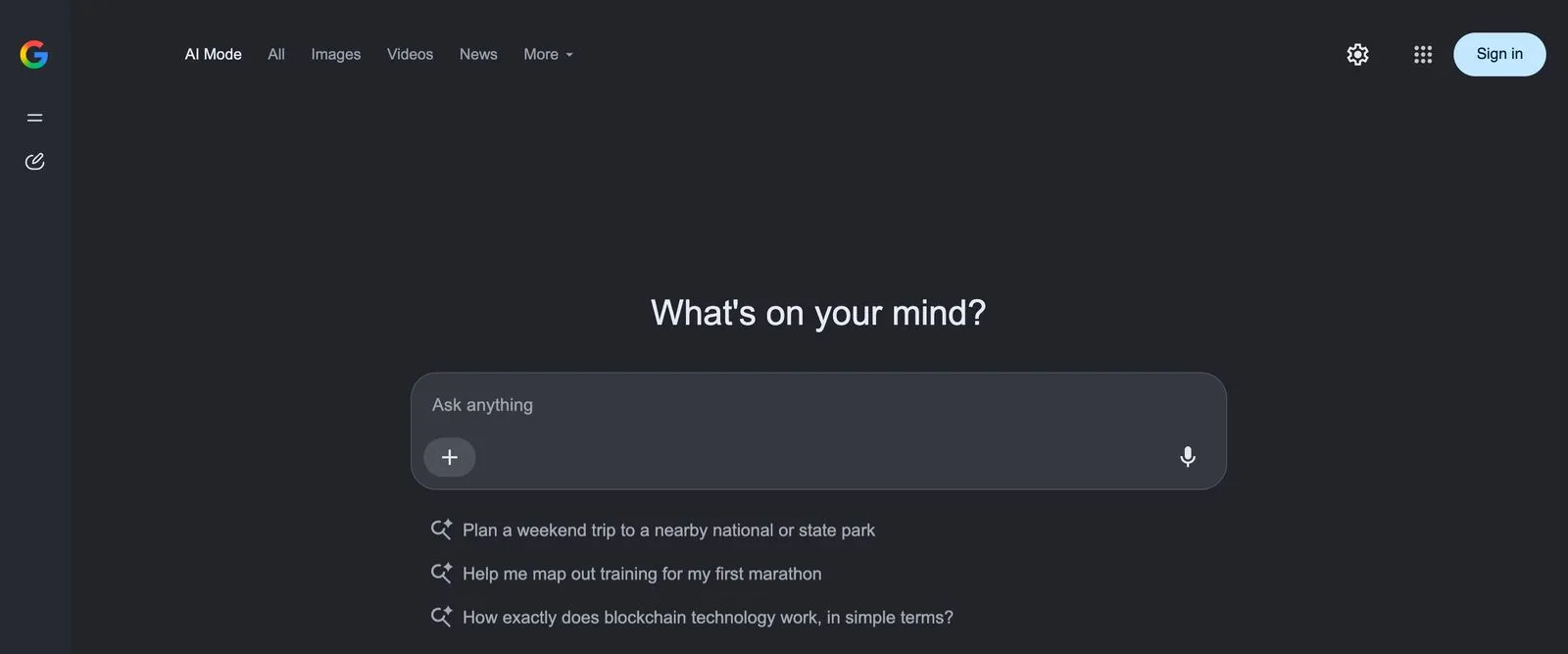
We opened AI Mode in English without signing in. The start page shows the AI Mode tab first, then All, Images, Videos and News, with a box in the middle that reads Ask anything.
Is AI Mode Available In Thailand And In Thai
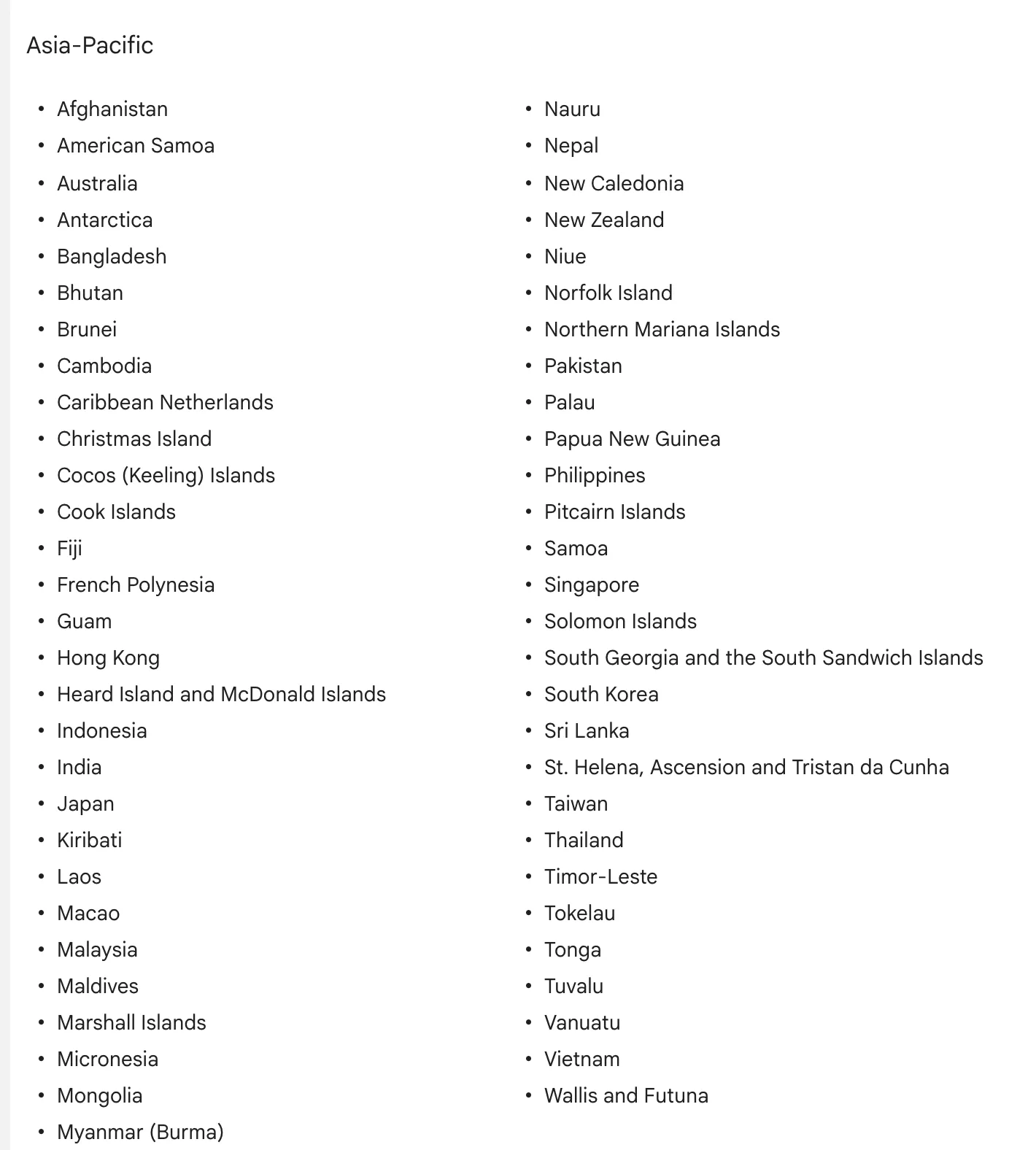
Yes. Google’s help page lists Thailand among the countries where AI Mode works. Thai and English are both on its list of languages, so people in Thailand can ask in either one.
The capture below shows the Asia-Pacific part of Google’s country list.
Why The AI Mode Tab Can Be Missing
Google’s help page gives no single reason, so start with google.com/ai, which opens AI Mode directly. Google also says it will keep updating the AI Mode interface.
Work accounts have one more condition. When a Google Workspace admin turns off Search and Assistant, only that admin can switch Search history back on. AI Mode still works without history, but you cannot pick up an old conversation.
How To Turn Off AI Mode
AI Mode only runs when you open it. To go back to the normal results, tap All at the top of the page, as Google’s help page suggests. The AI summary at the top of a normal results page is a different feature, an AI Overview.
To clear what you asked, open AI Mode history on the left of the page. You can delete one search there, or all of them.
How Google AI Mode Chooses The Pages It Cites
AI Mode splits your question into subtopics and searches for each one at the same time. Google calls this query fan-out. The pages come from the Search index, and Google’s core ranking systems pick them, as Google’s guide to generative AI features explains. The model then writes its answer from those pages and links the ones that support it.
In the guide’s example, the question “how to fix a lawn that’s full of weeds” might bring extra searches such as “best herbicides for lawns” and “how to prevent weeds in lawn”. A page that answers one of those well can be cited, even if it never answers the main question.
Google says people ask AI Mode questions nearly 3 times longer than traditional searches. In normal search, question searches already go to article pages. We looked at one week of Search Console data from 69 of Primal’s client websites. On the median site, article pages took about 9 in 10 of the impressions from question searches. Home pages and product or service pages took under 1 in 100. AI Mode uses the same ranking systems, so a site with only a home page and service pages gives it little to cite.
Google sets 2 conditions for a page to be linked.
- The page is indexed and can show in Google Search with a snippet, the short text under a result.
- The site is included in the Search generative AI setting in Search Console. Include is the default.
Google lists no other technical requirement. Its guide says you do not need an llms.txt file, special markup or content cut into small chunks. When AI Mode is not confident in an answer, it may show a list of web links instead.
Customers Often Ask Us How A Brand Gets Seen When Nobody Clicks
A brand can show in AI Mode in 2 ways. It can be a linked source beside the answer, or its name can appear in the answer itself. The second way depends a lot on other websites. Google’s guide says its AI features show what people say about products and services in blogs, videos and forums.
Our data agrees with this. Over the last month, Elevate, Primal’s AI Visibility Tracker, logged 285,098 AI answers to questions in the categories of 171 brands. A brand’s own website was cited in only about 1 in 5 of them. So your brand needs a place on the review sites and forums your customers read. Google adds that seeking fake mentions is not as helpful as it might seem.
How To Get Your Website Cited In Google AI Mode
First make sure Google can cite the page. Then write pages that answer the questions your customers ask. Work through these steps in order.
- Inspect each key page’s address in Search Console to check that it is indexed. A page outside the index cannot be a link in AI Mode.
- Check the page’s code for a nosnippet tag, or a max-snippet value set very low. Google uses these to limit the text it shows in its AI features too.
- In Search Console, open Settings, then Search generative AI, and check that your site is still included.
- Write pages that answer a long question in full. Use the questions customers ask your team as headings, and answer in the first sentence under each one. Our post on answer engine optimisation shows how to write them.
- Answer the smaller questions AI Mode will search next, such as the price and the areas you serve. Put them on the same page or on pages linked to it. Google’s guide warns against making a separate page for every variation of a question.
- If you sell online, send product data through a Merchant Center feed. If you have a shop or an office, keep your Google Business Profile up to date. Google’s guide says both help products and businesses show in AI answers.
- Ask AI Mode your customers’ questions once a month. Note which sites it cites and which brands it mentions, then compare with the month before.
Mark McDowell, who founded Primal, has seen step 4 conflict with how some brands prefer to write. On a luxury travel account this year, the brand wanted its pages to stay expensive and mysterious, and pages full of keywords and long explanations would take away from that. I had told the client that AI likes specific answers, such as what the brand offers, why it matters and what sets it apart. So the team’s work was to find the point between the details AI needs and the voice the brand wanted to keep.
How To Measure Google AI Mode In Search Console
Search Console reports AI Mode inside the Performance report, under the Web search type, together with every other result. That report does not split AI Mode out. Search Console’s help page on clicks and impressions explains how AI Mode is treated.
- A click on a link to an outside page in AI Mode is a click.
- Position follows the same method as a normal Google results page.
- A follow-up question is a new query. The impressions, position and clicks in the new answer go to that new query.
Search Console also has a generative AI performance report. It shows impressions of your links in AI Overviews and AI Mode together, by page, country, date and device. Compare its pages with the clicks the same pages get in the Performance report. That shows which cited pages people go on to open.
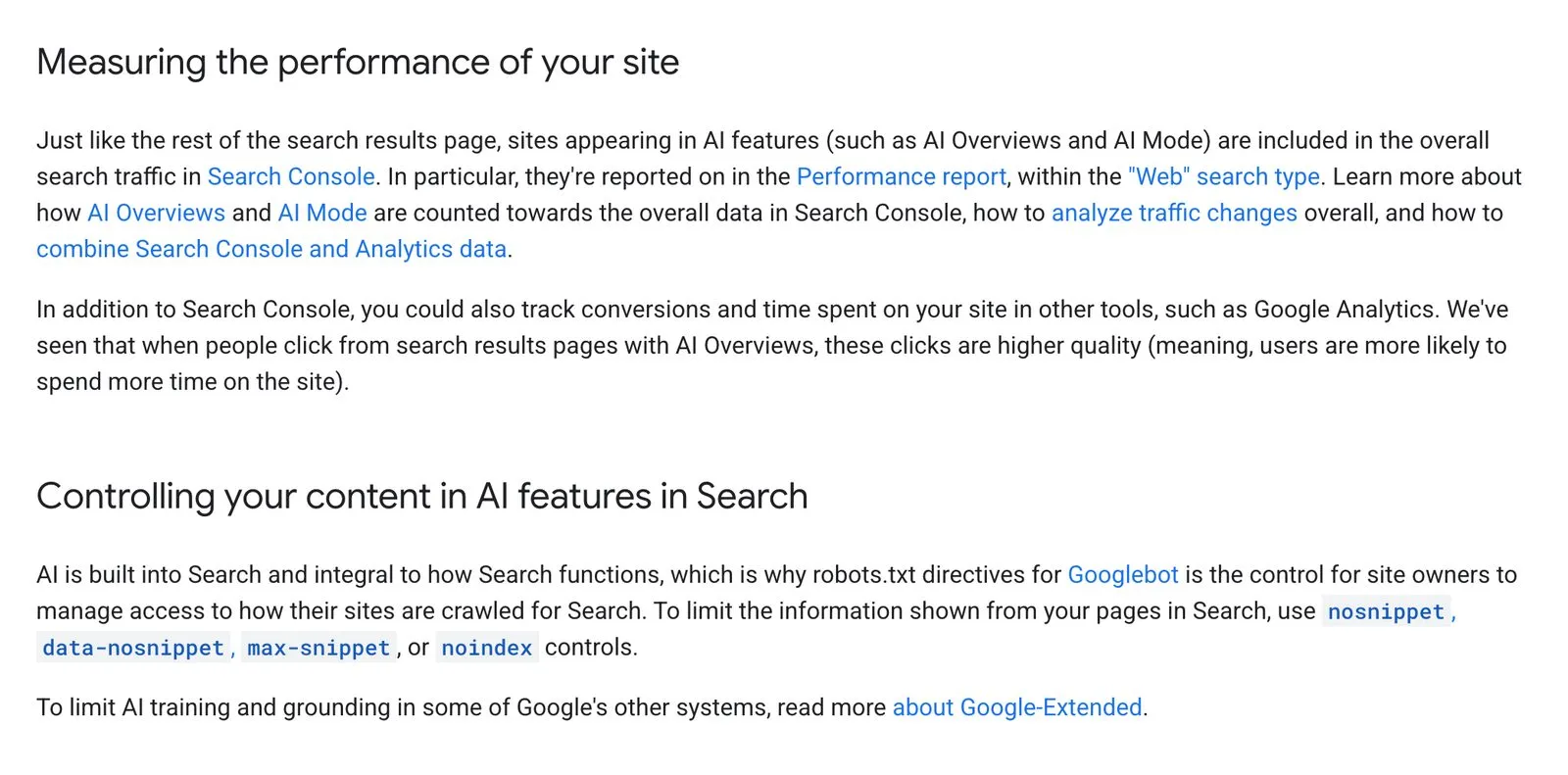
We captured 2 sections of Google’s Search Central page on AI features. The first says AI Mode traffic sits in the Web search type. The second lists the tags that limit what Google shows from a page.
Customers Often Ask Us Whether GA4 Shows Visits From AI Mode
Not as a separate source. Google’s Analytics help page says Google Analytics 4 (GA4) puts visits from AI Overviews and AI Mode in the Organic Search channel. Its AI Assistant channel covers ChatGPT, Gemini, Deepseek, Copilot and Grok, and leaves out those 2 Google features. Search Console’s generative AI report is where Google splits out its AI features, and it shows impressions for both features together.
How To Keep Your Website Out Of AI Mode
Use the Search generative AI control in Search Console and choose to exclude your site. Your links and content then leave AI Overviews, AI Mode and the generative AI features in Google Discover. You get no impressions or traffic from them, while content from other sites still shows.
Google says content is excluded within 1 to 2 days after the change goes live, and some takes longer. The control is not a ranking signal for the rest of Search. It does not stop AI training either, which Google-Extended controls. To limit only some pages, use nosnippet, data-nosnippet or max-snippet instead. For most brands we would leave the site included, because the answer still appears, written from other sites.
Are There Ads In Google AI Mode
Google has announced no ads in AI Mode for Thailand. Its Google Ads Highlights of 2025 page says it is testing ads in AI Mode in the United States, below answers and inside them.
Ads around AI Overviews are in more markets. Google Ads Help says ads can show above or below AI Overviews in every market that has them. Ads inside AI Overviews run in English in 12 countries, and Thailand is not one of them. They come from existing Search, Shopping and Performance Max campaigns. Advertisers cannot target that spot or opt out of it.
Customers Often Ask Us Whether Ads Can Replace SEO
No, because ads and SEO put a brand in different places. Ads buy space next to the answer. The source links in an AI Mode answer come from pages in Google’s index. A brand that runs only ads shows only in the ad space.
Primal’s AI SEO service does the SEO side of this work. The team writes pages that answer your customers’ questions. It then checks whether AI answers cite the brand, using Elevate, Primal’s AI Visibility Tracker. We work from our Bangkok office, with colleagues in Kuala Lumpur and Singapore.
Frequently Asked Questions About Google AI Mode
Do You Pay To Use Google AI Mode
No. AI Mode opens without a plan and without signing in, as our capture above shows. Google’s help page asks for a paid plan only for one option, the Gemini 4 Argon model. That option is for Google AI Pro and Ultra subscribers aged 18 and over.
Do You Need Schema Markup Or An llms.txt File For AI Mode
No. Google’s guide says Google Search does not use llms.txt files or special markup for its AI features. Structured data is not required either. Schema markup still helps a page qualify for rich results in normal search.
What To Do When AI Mode Gets Your Brand Wrong
Send feedback first. Google’s help page says AI Mode can misread web content or miss context, and asks you to rate a wrong answer with the thumbs-down icon. Then open the pages the answer cites. Fix the facts on your own pages, and ask the other sites to correct theirs.
What Google Does With What You Type In AI Mode
Google says it uses what people search for and the feedback they send to improve its AI features in Search. Reviewers see data that is disconnected from the user’s account. You can delete your AI Mode history from the panel on the left of AI Mode. Keep confidential company data and customers’ personal details out of your questions.
Senior SEO Specialist
Panlert Champakhom has worked in search engine optimisation (SEO) since 2018 and is a Senior SEO Specialist in Primal’s technical team. His work covers technical SEO, keyword research, on-page and content optimisation, and internal linking. His current focus is AI search, helping brands earn citations in Google AI Overviews, ChatGPT, Perplexity and Gemini.
About The Author