

By Mark McDowellPosted: Updated: 11 min read
What Are AI Overviews And How To Get Your Website Cited
AI Overviews are short answers written by Google's artificial intelligence (AI) at the top of some search results, with links to the pages they draw on. Google takes those pages from its normal search index. So a page has to be indexed and able to show a snippet, and Google lists no other technical requirement.
Key Takeaways
- Google takes the pages it cites in AI Overviews from its normal search index, so search engine optimisation (SEO) is still the base of the work.
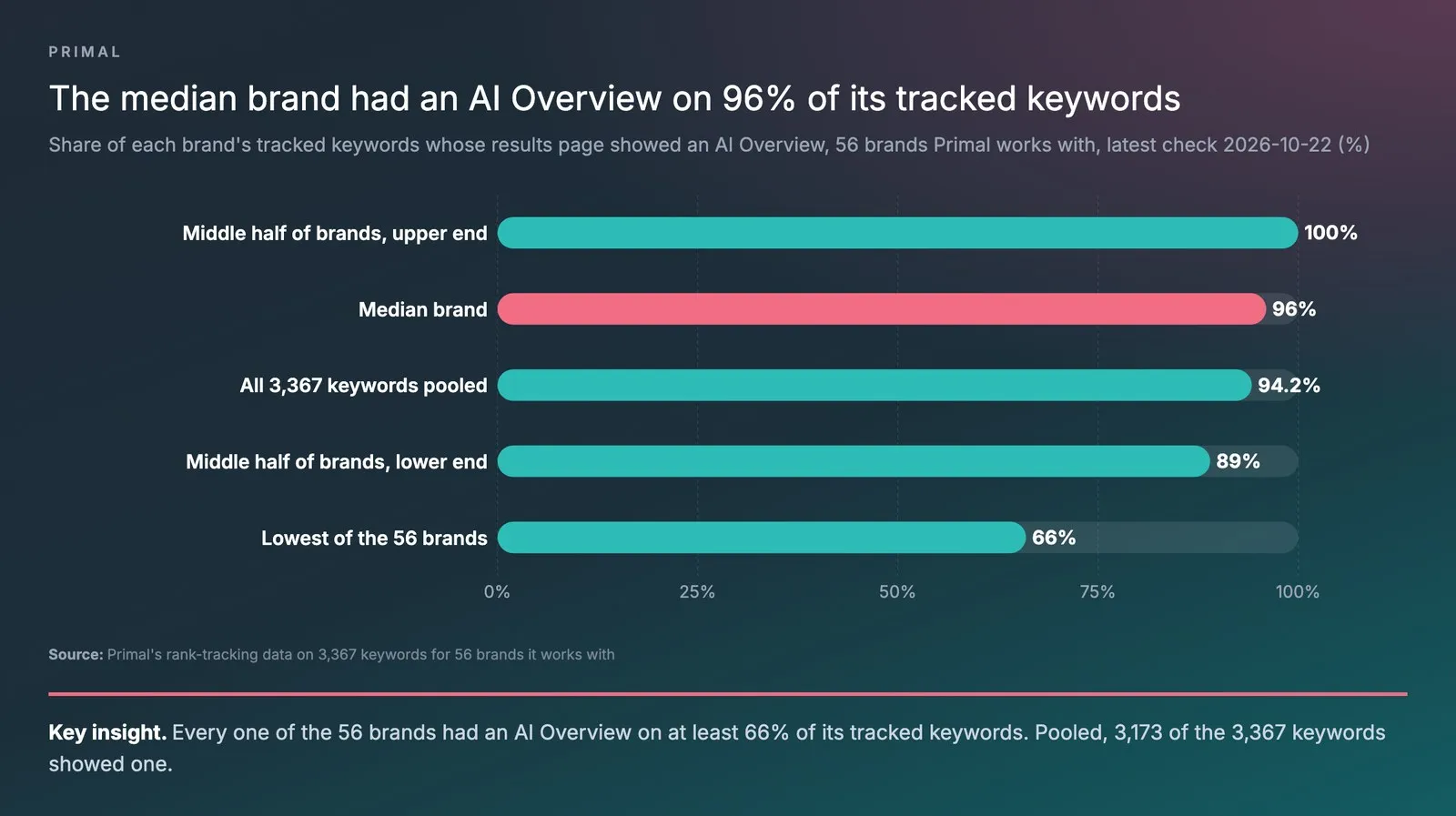
- Across the 56 brands Primal works with, Google showed an AI Overview for a median of 96% of each brand's tracked keywords on the latest check, 2026-10-22.
- On the same check, every one of the 56 brands had an AI Overview on at least 66% of its tracked keywords, and 3,173 of all 3,367 keywords (94.2%) showed one.
- Search Console's generative AI performance report shows how often links to your site appeared in AI Overviews and AI Mode, by page, country and device.
- Users cannot switch AI Overviews off, and a site that opts out in Search Console gets no impressions or traffic from them, while the answers are still written from other sites.
What Are AI Overviews
AI Overviews are short answers that Google’s AI writes at the top of a results page. Each one links to the pages it used. Google shows one only when its systems judge that it adds something to the normal results.
Most tracked searches now show one. Across the 3,367 keywords in Primal’s rank-tracking data for 56 brands it works with, 94.2% showed an AI Overview on the latest check, 2026-10-22.
So a buyer often reads Google’s answer before they see your website. That gives a brand two jobs. The first is to be the page Google cites. The second is to check in Search Console which of your pages it cites.
Where AI Overviews Get Their Answers
AI Overviews get their answers from pages in Google’s normal search index. Google’s page on AI features says a linked page must be indexed and able to show a snippet. It adds that there are no other technical requirements.
Google’s guide to generative AI features says the system first pulls relevant, current pages from the index. It then writes the answer from those pages and links to them.
It may also split one question into several smaller searches. Google calls this query fan-out. Take the question “which health insurance suits parents over 60”. Some smaller searches might cover premiums by age and illnesses the parents already have. Others might cover the yearly limit and the waiting period. A page that answers one of them well can be cited. It does not need to rank first for the main question.
Rank still matters. Ahrefs studied 1.9 million citations in 1 million AI Overviews. About 3 in 4 of the cited pages ranked in the top 10 of the normal results.
AI answers also cite other sites about a brand more often than the brand’s own site. Over the last month, Elevate, Primal’s AI Visibility Tracker, logged 285,098 AI answers to questions in the categories of 171 brands. A brand’s own website was cited in only about 1 in 5 of them. Facebook was among the 15 most-cited sites for 161 of the 171 brands.
Which Searches Show An AI Overview
Google shows an AI Overview only when its systems judge that it adds to the normal results. It says many searches get none. In the data below, the searches without one are the exception.
Primal’s rank-tracking data for 56 brands it works with records the results page of every tracked keyword. On the latest check, 2026-10-22, the median brand had an AI Overview on 96% of its tracked keywords. The middle half of the brands sat between 89% and 100%. Pooled across all 3,367 keywords, 3,173 (94.2%) showed one.
No brand was at half or below. The brand with the fewest still had an AI Overview on 66% of its tracked keywords. So for most brands, the useful question is which pages the AI Overview cites.
The chart shows the spread across the 56 brands.
Are AI Overviews Available In Thailand And In Thai
Yes. Google’s help page on AI Overviews lists Thailand among its countries, and both Thai and English among its languages.
How AI Overviews Differ From Featured Snippets And AI Mode
An AI Overview writes a new answer from several pages. A featured snippet quotes text from a single page. AI Mode is a separate chat page where people can keep asking follow-up questions. All three draw on Google’s index.
| Featured snippet | AI Overview | AI Mode | |
|---|---|---|---|
| Where it shows | Top of the normal results | Top of the normal results | Its own page, apart from the normal results |
| Where the answer comes from | Text quoted from one page | New text written from several pages | New text written from several pages, with follow-up questions |
| Best for | A question one paragraph can answer | A topic that needs several sources | Questions that need exploring, comparing or reasoning |
| Links in the answer | One | Several | Several |
Google says AI Mode and AI Overviews may use different models and methods. So their answers and links can differ. On a phone, people can tap Show more under an AI Overview, then ask a follow-up in AI Mode. Our post on Google AI Mode explains how that mode picks its sources.
Is SGE The Same As AI Overviews
Yes. SGE, short for Search Generative Experience, was the name of Google’s test of AI answers in Search Labs. Google opened AI Overviews to everyone in the United States after people had used them billions of times in that test. An older article about SGE describes the same feature at its test stage.
How To Get Your Website Cited In AI Overviews
Get the page indexed and rank for the searches that show an AI Overview. Then answer the question in the first sentences, and add something only you can say.
Google’s guide says the usual SEO practices still apply. Its AI features rest on the same ranking and quality systems as Search. Start with two checks in Search Console.
- Check that the page is indexed. Run the page’s address through the inspection tool in Search Console. Make sure no nosnippet tag, or a max-snippet value of 0, blocks the text by mistake. Then check that robots.txt and your hosting let Googlebot reach the page.
- Check that your site is not excluded. In Search Console, open Settings, then Search generative AI, and make sure your site is included. Google’s guide says a site must be included to be eligible. Include is the default setting.
- Find the searches that show one. Take the 20 most important searches from the Performance report and search each one yourself. Note which show an AI Overview and which pages it cites.
- Rank for those searches. Content, links and technical SEO are still the base. AI Overviews draw on the same index and ranking systems as the normal results.
- Answer first under each heading. Write headings as the questions your customers ask. Then give the answer in the first one or two sentences, before the detail.
- Add what only your brand has. Google’s guide asks for content that goes past common knowledge. First-hand experience from your own work is one example. It also suggests good images and video beside the text.
- Keep your business details the same everywhere. AI answers can include product and local business details. So keep your Google Business Profile and your Merchant Center product feed in line with your website.
The first thing I look for in a client’s Search Console is the decoupling. Impressions stay high while clicks start to dip, because the AI Overview answered the question. The second thing we see in Thailand is language. An English post ranks slowly. The same post rewritten in Thai ranks almost immediately and draws traffic, and a page that ranks is a page Google can cite.
The video below goes through these steps.
A video from my YouTube channel on how to rank in Google AI Overviews.
What You Can Skip
Google’s guide says Search does not use AI text files such as llms.txt, so you do not need one. You need no special markup or Markdown either.
It also says there is no need to cut content into small chunks. Its systems understand synonyms, so a page does not need every wording of a phrase.
Structured data is not required for AI features. Google still suggests it, because it helps pages qualify for rich results. A separate page for every small question does not help either. Google’s guide warns that doing this mainly to sway rankings or AI answers breaks its policy on scaled content abuse. And chasing fake mentions on other sites “isn’t as helpful as it might seem”, in the guide’s words.
Do AI Overviews Mean Fewer Clicks To Your Website
For many searches, yes. Pew Research studied Google searches by adults in the United States. When an AI summary appeared, people clicked a normal result on 8% of visits, against 15% when none appeared. They clicked a link inside the summary on about 1% of visits.
Google’s page on AI features makes a different point. It says clicks from pages with AI Overviews are higher quality. People who click are more likely to spend more time on the site.
So a “what is” page written only to get clicks is worth less than it was. We judge those pages on whether Google cites them. We judge the site as a whole on the enquiries and orders it brings in.
How To Measure AI Overviews In Search Console
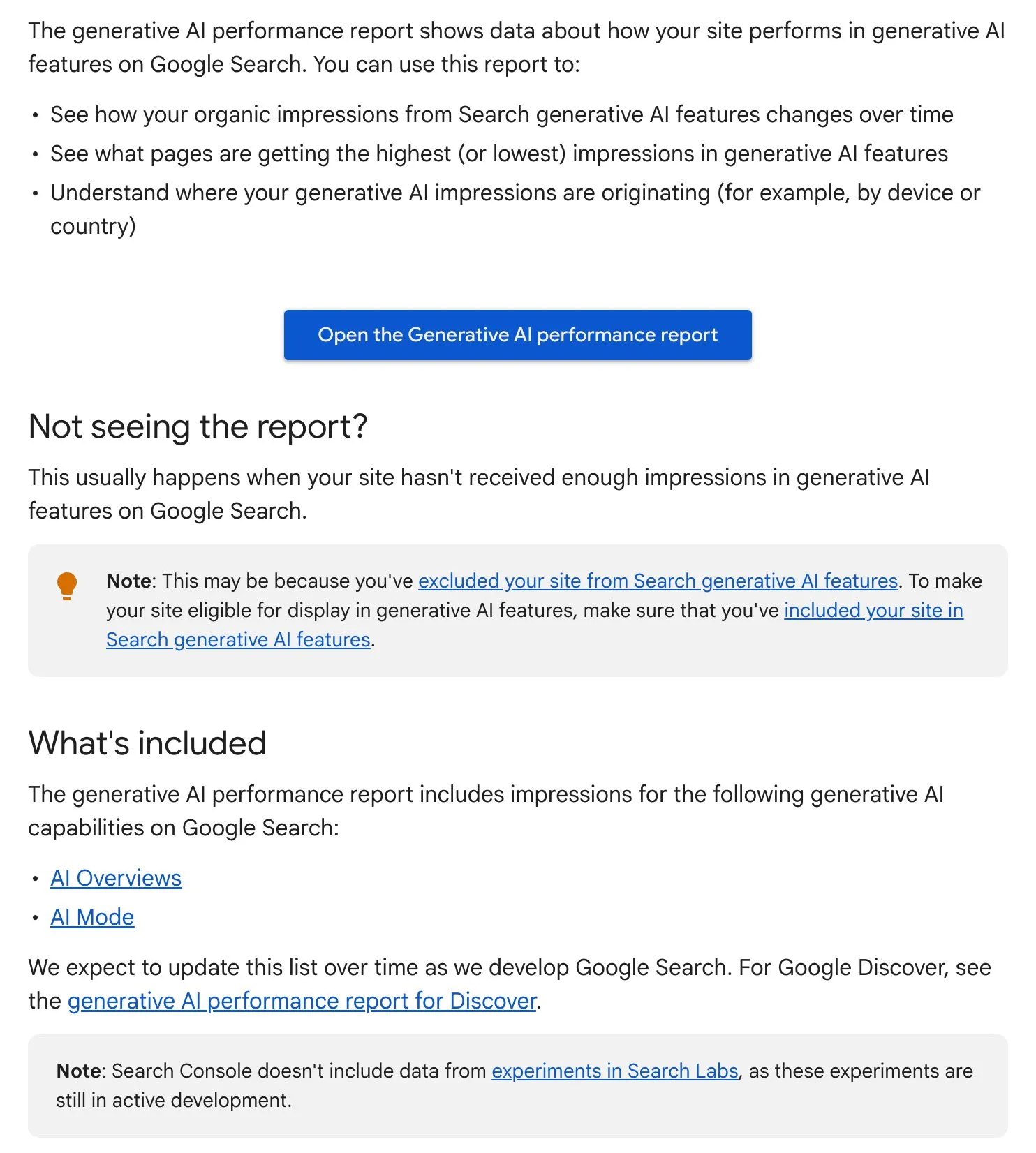
Use the generative AI performance report in Search Console. Google’s help page for the report says it shows impressions from AI Overviews and AI Mode. Every site now has it. An impression here means a link to your site was shown in one of those features.
The capture below is the top of that help page. It lists what the report shows and which features it covers.
- Open Search Console and choose the generative AI performance report.
- Open the Pages tab to see which pages earn the most impressions in AI features.
- Open the Countries and Devices tabs to see where those impressions come from.
- Open the normal Performance report for the same pages and dates, and compare the clicks.
The generative AI report deals in impressions. For clicks, use the normal Performance report, where Google includes AI features under the Web search type. Read the two side by side. A page whose AI impressions rise while its clicks stay flat is being read on Google. Give people a reason to visit, such as a booking form. Or judge that page on another goal.
No report usually means your site has too few impressions in these features, the help page says. It can also mean the site is excluded.
Can You Turn Off AI Overviews
Users cannot turn AI Overviews off, but site owners can keep their content out of them. Google’s help page calls AI Overviews a core Search feature, like knowledge panels. A user who wants plain links can choose the Web filter after a search.
For site owners, the Search generative AI control sits under Settings in Search Console. It has three options. Include is the default. Exclude takes your links and content out of AI Overviews, AI Mode and the generative AI features in Google Discover. The third option follows the setting of the parent property.
Google says an excluded site gets no traffic or impressions from these features, while content from other sites still appears. The control is not a ranking signal for the rest of Search. It also does not stop AI training on your pages, which needs Google-Extended. A change generally takes a few days.
For most brands, we suggest leaving it switched on. The AI Overview still appears when you opt out, written from other sites. Opting out suits a site that earns from each page view, such as a publisher paid per ad view. Even then, wait until the generative AI report shows that the summaries are taking visits.
How To Start In 4 Weeks
A brand can set this up in 4 weeks, then repeat the checks each month.
- Week 1, check the basics. Look at indexing, snippet settings, robots.txt and the Search generative AI control.
- Week 2, find the searches that show one. Search your 20 most important terms. Note which show an AI Overview and which sites it cites instead of you.
- Week 3, fix the pages. Put the answer in the first one or two sentences under each heading. Add facts from your own work.
- Week 4, measure. Open the generative AI report and compare impressions with clicks for the same pages.
If you want a team to run this every month, that is Primal’s AI SEO service. The team follows the questions your customers ask in Google AI Overviews, ChatGPT and Gemini with Elevate, Primal’s AI Visibility Tracker. Then it plans the SEO work around what the data shows. We work from our Bangkok office, with colleagues in Kuala Lumpur and Singapore.
Frequently Asked Questions About AI Overviews
Why Am I Not Seeing An AI Overview On Google
Google shows one only when its systems judge that an AI answer will help, so many searches get none. The Web filter also hides AI Overviews.
How AI Overviews Differ From ChatGPT
AI Overviews sit inside Google’s results and take their pages from Google’s index. ChatGPT searches the web through OpenAI’s own systems and the search providers it works with. So a page that ranks on Google has a good chance in AI Overviews, but ChatGPT needs its own check. Our post on ChatGPT SEO covers how ChatGPT picks its pages.
Does A Page Need To Rank On Page One To Be Cited
Not always, but it helps a lot. Ahrefs found that about 3 in 4 cited pages ranked in the top 10. The rest ranked lower or not at all.
Query fan-out is one reason. The system runs several smaller searches. Google says this lets it show a wider range of links than a normal search.
Can AI Overviews Get Facts Wrong
Yes. Google’s help page says AI Overviews can and will make mistakes. It advises checking important facts in more than one place.
If an answer gets your brand wrong, correct the facts on your own pages and on the sites it cites. Then use the thumbs-down icon under the answer to tell Google.
Customers Often Ask Us Whether Good SEO Gets Them Into AI Overviews
It makes a citation more likely, but it is not the whole job. AI Overviews draw on the same index and ranking systems as the normal results, so SEO is the base. The extra work is writing pages that answer real customer questions in their first sentences. Your brand also needs mentions on the other sites AI reads in your category.
Customers Often Ask Us Where To Start When A Competitor Shows Instead
Start with the pages the AI Overview cites. Search the term yourself and open each cited page. Note what those pages answer that yours does not.
Then answer that question in your page’s first sentences, and add facts the cited pages lack. If the cited sources are review sites or forums, your brand needs a presence there too.
Customers Often Ask Us Whether They Can Check AI Overviews Themselves
Yes, but one search tells you little, because answers change with the person, the day and the place. Google’s own figures sit in the generative AI performance report in Search Console.
A better guide is to ask the same questions every day across several AI platforms. Then read the results together to see the trend. Elevate, Primal’s AI Visibility Tracker, works this way, and changing the set of questions starts the series again.
Founder and Chief Executive Officer
Mark McDowell is the Founder and Chief Executive Officer of Primal, which he started in Bangkok in 2015. He is on the Forbes 30 Under 30 Asia 2020 list and was Campaign Asia’s Southeast Asia Young Achiever of the Year in 2018. He writes about AI search and search engine optimisation.
About The Author