

By Pimlapat PhansuathongPosted: Updated: 13 min read
What Is Schema Markup And What It Does For SEO
Schema markup is code on a web page that tells search engines and artificial intelligence (AI) systems what each fact is, such as a business name, an address, opening hours or a price. It uses the Schema.org vocabulary, usually written as JSON-LD (JavaScript Object Notation for Linked Data). It makes a page eligible for rich results such as review stars, but Google does not guarantee them.
Key Takeaways
- Across 995 keywords in Primal's rank-tracking data for 17 client brands, 360 Google results pages, about 1 in 3, showed review stars on at least one listing, and 859 showed an AI Overview.
- Google stopped showing the frequently asked questions (FAQ) rich result on 2026-05-07, and its search gallery lists 25 rich result features with no FAQ or How-to feature among them.
- Google's review snippet guide gives no stars to a business's own LocalBusiness or Organization pages when the business controls the reviews, including reviews shown through a Google or Facebook widget.
- Google says structured data is not required for its generative AI features, while Microsoft Bing says schema helps search engines and AI systems understand content.
- In 285, 098 AI answers logged over the last month by Elevate, Primal's AI Visibility Tracker, a brand's own website was cited in only about 1 in 5, so the facts in your markup should match your profiles on other sites.
What Is Schema Markup
Schema markup is code that labels the facts on a web page, so search engines and AI systems read them without guessing. A person who sees 02 000 0000 under a café’s name knows it is the phone number. A machine has to work that out. The markup says it directly, in a field called telephone.
The labels come from Schema.org, a shared vocabulary that Google, Microsoft, Yahoo and Yandex founded. So the same labels work across the main search engines. There is a type for almost anything a page can describe. LocalBusiness is for a shop with a street address, Product is for an item for sale and Article is for a blog post.
Our data shows that the rich results markup can earn still appear often on Google. Across the 995 keywords in Primal’s rank-tracking data for 17 client brands, 360 Google results pages showed review stars on at least one listing. That is about 1 in 3. Google’s review snippet guide says it may show stars when it finds valid review or rating markup.
The chart below shows how often each feature appeared on the same results pages. Review stars are the feature on the list that markup feeds directly.
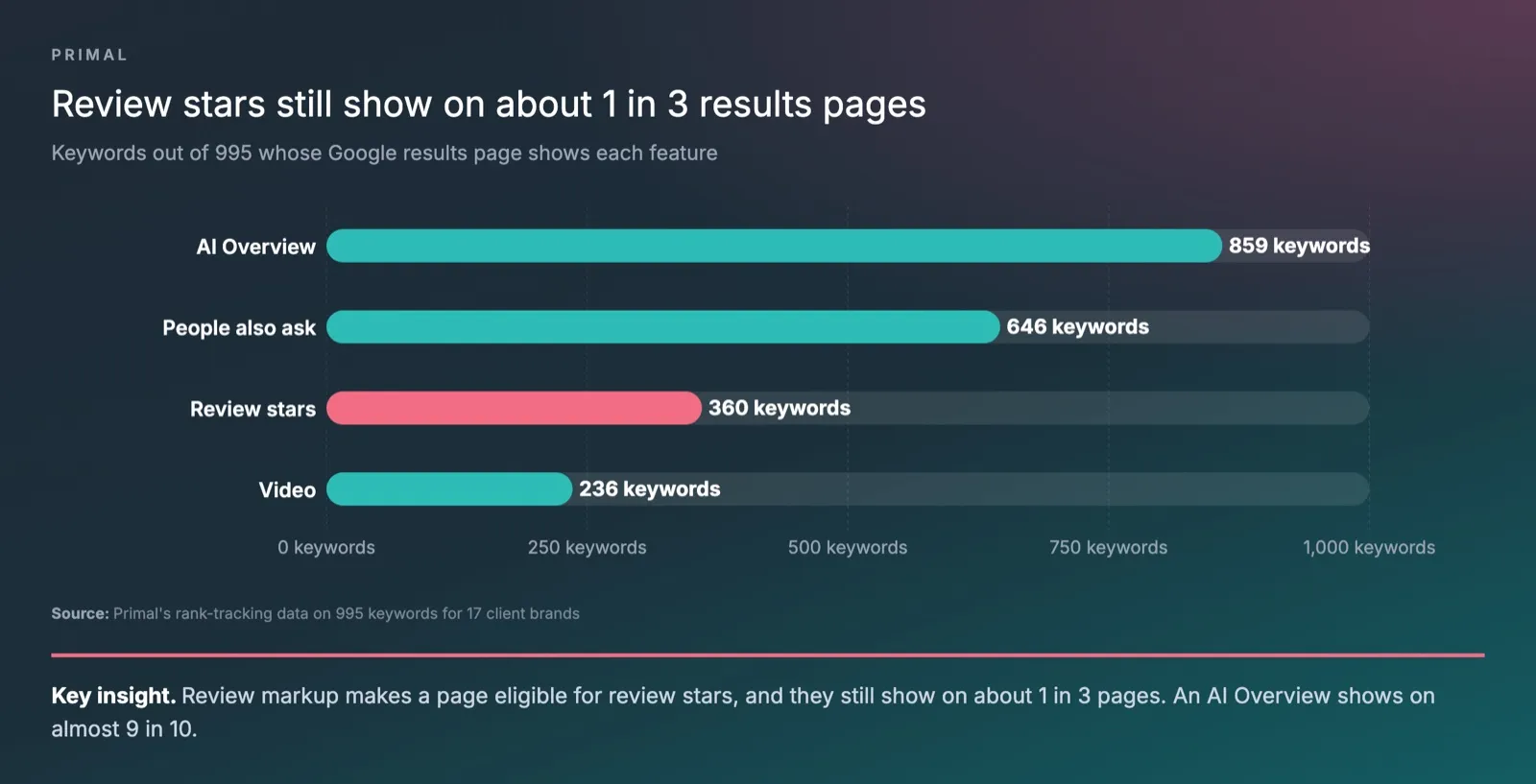
An AI Overview was the most common feature on these pages. People also ask came next, then video. Review stars varied widely from brand to brand. One brand saw stars on 2 in 100 of its keywords, and another on 95 in 100.
AI answers read many sites before they reply. Over the last month, Elevate, Primal’s AI Visibility Tracker, logged 285,098 AI answers to questions in the categories of 171 brands. A brand’s own website was cited in only about 1 in 5 of them.
So the work has two parts. The first is marking up the facts on your own pages, so they qualify for the rich results Google still shows. The second is keeping the same name, address, hours and contact details on the other sites that AI answers read. Markup does the first part in full. It helps with the second by linking your site to your official profiles.
Schema Markup Vs Structured Data
Structured data is information written in a fixed format, with a labelled field for each fact. Schema markup is the code that adds structured data to a web page, using the Schema.org vocabulary. Google’s documentation calls it “structured data”. Most search engine optimisation (SEO) guides use the two terms for the same thing.
Plain text on a page is unstructured data. Take a line such as “Open Monday to Friday 7am to 6pm, weekends 8am to 8pm”. A reader understands it at once. A machine has to pick out the days and the times by itself. Structured data writes the same hours as separate fields for the days, the opening time and the closing time.
JSON-LD, Microdata And RDFa
Schema markup comes in 3 formats. JSON-LD sits in its own script block, apart from the text readers see. Microdata and RDFa (Resource Description Framework in Attributes) sit inside the page’s HTML (HyperText Markup Language) tags.
Google’s introduction to structured data says JSON-LD is the easiest for most sites. It also says all 3 work equally well for Google when the code is valid.
| Format | Where it sits | Best for |
|---|---|---|
| JSON-LD | A separate script block in the page head or body | Most sites, because each fact can be changed in one place |
| Microdata | Attributes inside the HTML tags that wrap the content | Sites whose theme already prints Microdata |
| RDFa | Attributes inside the HTML tags, as with Microdata | Content management systems (CMS) that already use RDFa |
Does Schema Markup Help SEO
Schema markup changes how a result can look, and Google does not present it as a way to rank higher. Google’s documentation gives structured data 2 jobs. It helps Google understand a page, and it makes the page eligible for rich results.
A rich result is a listing with extra detail, such as stars, a price, stock or opening hours. Many guides call these listings rich snippets.
Google’s general structured data guidelines show where one job ends and the other starts. If Google takes manual action on spammy markup, the page can no longer get rich results. Its place in web search stays the same.
The gain is in clicks. A rich result takes more space and answers part of the question before anyone clicks. Google’s introduction gives the example of Nestlé. It measured an 82% higher click-through rate (CTR) on pages shown as rich results than on pages without them.
You can measure the effect on your own site. Add markup to one group of pages, then compare their CTR in Google Search Console with the months before. Compare it with a similar group you left alone, too. The Performance report in Search Console also shows how often your pages appear as a rich result.
Which Rich Results Google Still Shows
Google’s search gallery lists 25 rich result features. They include product, review snippet, local business, organisation, article, breadcrumb, event, job posting, recipe and video. The FAQ result and the How-to result are no longer on the list.
Google’s documentation updates say the FAQ rich result stopped appearing in Google Search from 2026-05-07. How-to results were dropped earlier, on desktop and mobile. Google also retired book actions, ClaimReview, estimated salary and vehicle listing. Breadcrumbs now show on desktop results only.
Check the gallery before you add any type. A type missing from it can be valid Schema.org code and still change nothing on Google’s results page.
Why Your Own Reviews Get No Stars
Google gives no review stars to a business’s own pages for reviews the business controls. The review snippet guide says such pages cannot get stars when they use LocalBusiness or any Organization markup. This covers reviews shown through a widget too, such as a Google Business Profile or Facebook reviews widget.
So a restaurant that shows its widget rating on its home page will not get stars for it. Stars still work on pages that review a product, a recipe, a book, a film or an app. They also work on sites that collect reviews of other businesses.
The same guide bans fake reviews, on the page and in the markup. It also bans reviews written in return for money, discounts, vouchers or products when the page does not clearly say so.
Which Schema Types Your Business Needs
Every business site should start with 2 types. Organization markup goes on the home page or about page, and BreadcrumbList markup on pages inside a section. Then add the type that matches what each page shows. The table pairs common businesses with the markup to use and what Google’s gallery says it can show.
| Business | Page | Schema type | What Google can show |
|---|---|---|---|
| Any business | Home page or about page | Organization | Logo, name and contact details in the knowledge panel |
| Any business | Pages inside a section | BreadcrumbList | The page’s place in the site, on desktop results |
| Shop, clinic, hotel or restaurant | Branch or contact page | LocalBusiness, or a subtype such as Restaurant, Dentist or Hotel | Opening hours, location and contact details |
| Online store | Product pages | Product with Offer and AggregateRating | Price, stock and review stars |
| Blog or publisher | Articles | Article or BlogPosting, with the author | Headline, image and date |
| Event organiser | Event pages | Event | Date, time and venue |
| Employer | Job pages | JobPosting | The job in Google’s job search |
| Any site with video | Pages with a video | VideoObject | The video and its key moments |
Many business-to-business (B2B) sites centre on service pages. Schema.org has a Service type, but Google has no rich result for it. A service page gains most from Organization and BreadcrumbList markup.
In the site checks our team runs before starting work, we often find no structured data at all on a site’s most visited pages. Clinic and shop sites often have no LocalBusiness markup. Those pages are the quickest place to start.
A Schema Markup Example For A Bangkok Business
This example is for a made-up café in Bangkok called Example Coffee House. Its name, address, phone number, map position and profile links are all invented. The café opens 07:00 to 18:00 on weekdays and 08:00 to 20:00 at weekends. The code goes in the head or body of its contact page.
<script type="application/ld+json">
{
  "@context": "https://schema.org",
  "@type": "CafeOrCoffeeShop",
  "name": "Example Coffee House",
  "alternateName": "บ้านกาแฟตัวอย่าง",
  "url": "https://www.example.com/",
  "image": "https://www.example.com/images/shopfront.jpg",
  "telephone": "+66-2-000-0000",
  "address": {
    "@type": "PostalAddress",
    "streetAddress": "99 Soi Example, Sukhumvit Road",
    "addressLocality": "Khlong Toei",
    "addressRegion": "Bangkok",
    "postalCode": "10110",
    "addressCountry": "TH"
  },
  "geo": {
    "@type": "GeoCoordinates",
    "latitude": 13.7300,
    "longitude": 100.5690
  },
  "openingHoursSpecification": [
    {
      "@type": "OpeningHoursSpecification",
      "dayOfWeek": ["Monday", "Tuesday", "Wednesday", "Thursday", "Friday"],
      "opens": "07:00",
      "closes": "18:00"
    },
    {
      "@type": "OpeningHoursSpecification",
      "dayOfWeek": ["Saturday", "Sunday"],
      "opens": "08:00",
      "closes": "20:00"
    }
  ],
  "sameAs": [
    "https://www.facebook.com/example.coffee.th",
    "https://page.line.me/example"
  ]
}
</script>
Each field does one job.
@typesays what kind of business it is.CafeOrCoffeeShopis a Schema.org subtype of LocalBusiness. A restaurant would useRestaurantand a dental clinicDentist.alternateNameholds the café’s Thai name, so the markup states that both names belong to one business.addressputs the street, district, province and postcode in separate fields, with TH as the country code.geoholds the café’s position, taken from its pin on Google Maps.openingHoursSpecificationgives weekdays and weekends as 2 separate blocks.sameAslinks to the café’s official profiles on other sites, here its Facebook page and LINE Official Account.
The code has no AggregateRating, because a business’s own review score on its own page gets no stars. Every value must match what the page shows. Google’s guidelines say not to mark up content that readers cannot see.
We pasted this code into the Schema Markup Validator at validator.schema.org. It returned 0 errors and 0 warnings, as the capture shows.
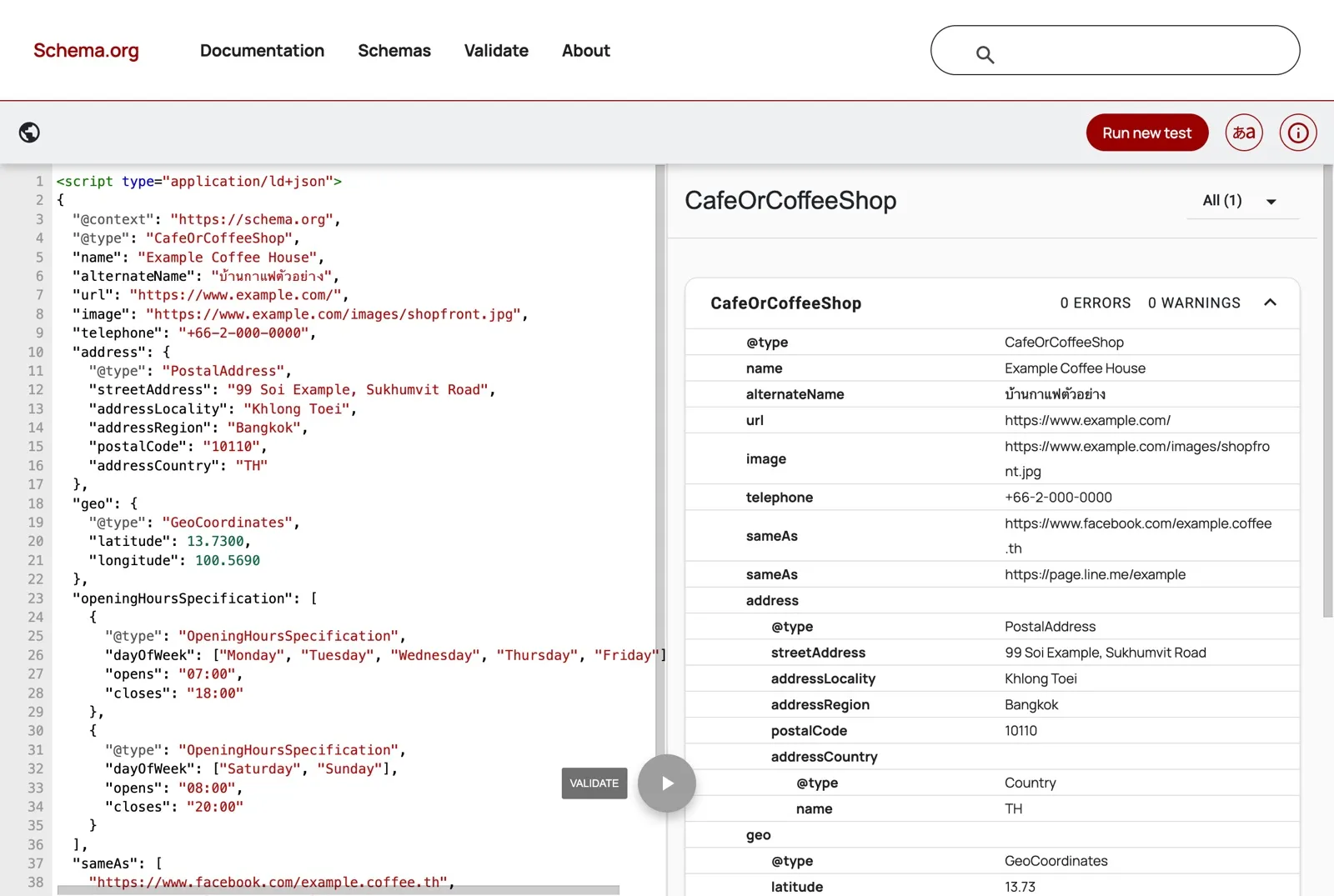
The validator checks the code against the Schema.org vocabulary. It does not tell you whether Google will show a rich result. That is the job of Google’s Rich Results Test.
If the café also sells coffee beans online, each product page gets Product markup with an Offer. The price is a plain number with a full stop before the decimals. The currency goes in its own field as THB, the code for Thai baht.
"offers": {
  "@type": "Offer",
  "price": "350.00",
  "priceCurrency": "THB",
  "availability": "https://schema.org/InStock"
}
How To Add Schema Markup To A Website
Add schema markup in 4 steps. Pick the Google feature that fits the page, write the JSON-LD, place it on the page, then test it.
- Find the page’s feature in Google’s search gallery. If none fits, Schema.org still has a type for the page, but the listing on Google will look the same.
- Write the code. Start from the example in Google’s guide for that feature, a schema markup generator or your own template, and check every value against the page.
- Put the script in the page template, add it with a WordPress plugin such as Yoast SEO or Rank Math, or add it as a tag in Google Tag Manager (GTM).
- Run the code through the Rich Results Test and the Schema Markup Validator, before launch and again on the live page.
A site with many product or branch pages should create the markup from the page template. The price or opening hours in the code then come from the same database as the page, so both change together. That is template work for your web development team.
Google Tag Manager suits pages you cannot edit directly. Google can read markup that JavaScript adds after the page loads, but other crawlers may not. Vercel’s study of AI crawlers found that the crawlers behind ChatGPT and Claude fetch JavaScript files but do not run them. So where you can, put the markup in the page’s own HTML.
How To Test Schema Markup
Test schema markup with 3 tools. Google’s Rich Results Test shows which Google rich results a page qualifies for. The Schema Markup Validator checks any Schema.org type, including the ones Google does not show. Google Search Console reports on the whole site once Google has crawled it.
- Before launch, open the Rich Results Test at search.google.com/test/rich-results and paste in the code, or the address of a live page. The tool may ask you to sign in with a Google account first.
- Check types with no rich result, such as Service markup or
sameAslinks, in the Schema Markup Validator. The Rich Results Test only reports the types Google has a rich result for. - After launch, open the rich result reports in Search Console. They list valid items and items with errors across the site.
- Test one page of each type again whenever you change the theme, a template or a plugin.
The Rich Results Test asked us to sign in before it would run the café’s code, so this post shows the validator result only.
Does Schema Markup Help With AI Search
Schema markup does not directly help a page appear in Google’s AI features, such as AI Overviews. Google’s guide to its generative AI features says these features do not need structured data. It adds that no special Schema.org markup is needed. The same guide says to keep using it, because it helps a page qualify for rich results.
Microsoft is more positive. Krishna Madhavan, a principal product manager at Microsoft Bing, wrote that schema “helps search engines and AI systems understand your content”.
Neither company says markup on its own earns a citation. AI answers draw on many sites besides yours. In the same 285,098 answers, Facebook was among the 15 most-cited sites for 161 of the 171 brands. The full data is in our post on what AI search is.
So use markup to state your facts clearly, then make sure other sites show the same facts. Give your Organization markup your registered name, logo, address and phone number. List your official profiles in sameAs, such as your Facebook page and LINE Official Account. Then correct any profile that shows a different name, address or phone number. That work on other sites is part of AI SEO.
Common Schema Markup Mistakes
Most schema markup mistakes come from code that says something the page does not, or from types Google no longer shows. Check for these 5 before a template goes live.
- Markup for content that is not on the page. A price or rating sits in the code but not on the page. Google’s guidelines say markup must describe what readers can see.
- Old facts. The café changes its hours or opens at a new address, and the code keeps the old details.
- Your own review score on your own business page. Google’s review snippet guide gives these pages no stars.
- Two Organization blocks that disagree. The theme and a plugin each add one, with different names or logos.
- FAQPage or HowTo markup added for a rich result. Neither shows in Google Search now.
Mark McDowell, who founded Primal, often finds no structured data at all on the business sites he reviews. On one manufacturer’s site this year, most of the pages with the most traffic had none. The other problem I see is markup that says something the page does not. On the previous version of our own website, the technical team found a plugin printing Article markup, with an old publish date and an author, on the home page and the SEO service page, and neither page is an article. Some people say structured data no longer matters, but AI tools read it, so we treat it as standard work.
Primal’s SEO services cover structured data as part of technical SEO, with site speed, crawling and indexing. We work from our Bangkok office, with colleagues in Kuala Lumpur and Singapore.
Frequently Asked Questions About Schema Markup
Should You Remove FAQ Schema
You do not need to, but do not add it for a rich result either. Google stopped showing the FAQ rich result on 2026-05-07. Google’s Search Central blog said in 2023 that structured data it does not use causes no problems for Search, and also has no visible effect. The questions and answers on the page still help your readers.
Customers Often Ask Us Whether They Can Add Schema Without Editing The Page Code
Yes, with Google Tag Manager or JavaScript, which suits sites where a head office controls the templates. Google’s documentation says it reads structured data added this way once the page has loaded. Test the live page in the Rich Results Test afterwards, because the markup only exists once the tag has run. Crawlers that do not run JavaScript will not see it.
Can ChatGPT Or Gemini Write Schema Markup
Yes, an AI assistant can draft JSON-LD from a page address or a list of facts. Treat the draft as a starting point. Check every value against the page and remove any field the page does not show. Then run the code through the Schema Markup Validator and the Rich Results Test before it goes live.
How Often To Check Your Schema Markup
Check it whenever you change the theme, a template or a plugin. Check it again when your business details change, such as a new address, phone number or opening hours. In between, look at the rich result reports in Search Console once a month.
How Long Before A Rich Result Appears
There is no fixed time. Google has to crawl the page again first, and its review snippet guide says that can take several days after a page is published. You can ask Google to crawl a page sooner with the inspection tool in Search Console. Even with valid code, Google does not guarantee a rich result.
Content Writer
Pimlapat Phansuathong is a Content Writer at Primal with over 6 years of writing experience. She writes search engine optimisation (SEO) content, from search intent and keyword research to the structure of each article. She joined Primal in 2022.
About The Author