

By Pimlapat PhansuathongPosted: Updated: 11 min read
What Is The Google Display Network And How Does It Work
The Google Display Network (GDN) is a group of more than 2 million websites, videos and apps, including YouTube and Gmail, where Google Ads shows image and video ads while people read, watch or use an app. In the 166 Google Ads accounts Primal manages, about 8 in 10 of these impressions came from campaigns other than Display, and Google is bringing Display campaigns into Demand Gen.
Key Takeaways
- The Display Network is more than 2 million websites, videos and apps, YouTube and Gmail among them, and it can reach people before they start to search.
- Over the 12 months to 2026-09-30, 106 of the 166 Google Ads accounts Primal manages showed ads on the Display Network but only 13 ran a Display campaign, and about 8 in 10 Display Network impressions came from other campaign types.
- Across the 100 accounts Primal manages with 10, 000 or more Display Network impressions, 1,000 impressions there cost about 109 baht at the median over the 12 months to 2026-09-30.
- Google began a migration tool for Display campaigns in 2026-06, and Demand Gen does not offer manual bids per click, bids per 1,000 viewable impressions or paying per conversion.
- Across 74 client accounts, the median click-through rate on the Display Network was 4.8% on phones and 0.7% on desktops over the 12 months to 2026-09-30, so judge the ads by what people do on your site after the click.
What Is The Google Display Network
The Google Display Network (GDN) is the set of websites, videos and apps where Google Ads can show your image and video ads. Google’s help page says it holds more than 2 million of them, with Gmail and YouTube included. The owners of these sites and apps partner with Google to show ads. So your ad appears while someone reads the news, watches a video or uses an app.
Many ads now reach this network without a Display campaign. Over the 12 months to 2026-09-30, 106 of the 166 Google Ads accounts Primal manages for clients showed ads on the Display Network. Yet only 13 of them ran a Display campaign. The other accounts reached it through Performance Max, Video and Demand Gen campaigns. Some reached it through Search campaigns with the Display Network switched on.
So if you run Performance Max or video ads, your ads may already be on the Display Network. That can be true even if you never made a Display campaign. The first job is to find which campaigns put your ads there and where they appear. Then you can pick the campaign type and the settings that fit your goal.
Where Display Network Ads Appear
Display Network ads appear on news and blog sites, in mobile apps, on YouTube and in Gmail. Google picks each space from your targeting and your bid.
So the list of sites and apps differs for every account, because it follows your brand and your audience. Open the “Where ads showed” placement report in Google Ads to see where your ads appeared before you decide which places to keep.
How The Display Network Differs From Google Search
Search ads show on the Search Network when someone types what they want into Google. Display ads show while people do something else. Google’s page on Display ads says the Display Network can reach people before they start to search. It can also remind people who already visited your website or app.
You can see the difference in the price. Cost per mille (CPM) is the price of 1,000 impressions. The table gives the median CPM on each network across the accounts Primal manages with 10,000 or more impressions on that network, over the 12 months to 2026-09-30. Each figure covers every campaign type that bought space on the network.
| Network | Accounts | Median CPM |
|---|---|---|
| Google Search | 148 | 1,615 baht |
| Display Network | 100 | 109 baht |
| YouTube | 93 | 26 baht |
So at the median, 1,000 impressions on Google Search cost about 15 times as much as on the Display Network. The lower price does not make the Display Network better value. People on Search are looking for what you sell. People on the Display Network are not looking yet. Compare the two by the cost of a lead or an order.
To see every campaign type and where each one shows, read what Google Ads is and how it works.
Which Campaigns Show Ads On The Display Network
Several campaign types can put your ads on the Display Network. The main ones are Display, Performance Max, Video, Demand Gen and Search campaigns with the Display Network option on. In the 166 client accounts over the 12 months to 2026-09-30, about 8 in 10 Display Network impressions came from campaigns other than Display.
For the median account, most impressions still came from other networks. Across the 160 accounts Primal manages with 10,000 or more Google Ads impressions, the median account had 4% of its impressions on the Display Network, 12 months to 2026-09-30.
The chart splits the Display Network impressions in those accounts, more than 160 million, by the campaign type that bought them. Display campaigns came third, behind Video and Performance Max.
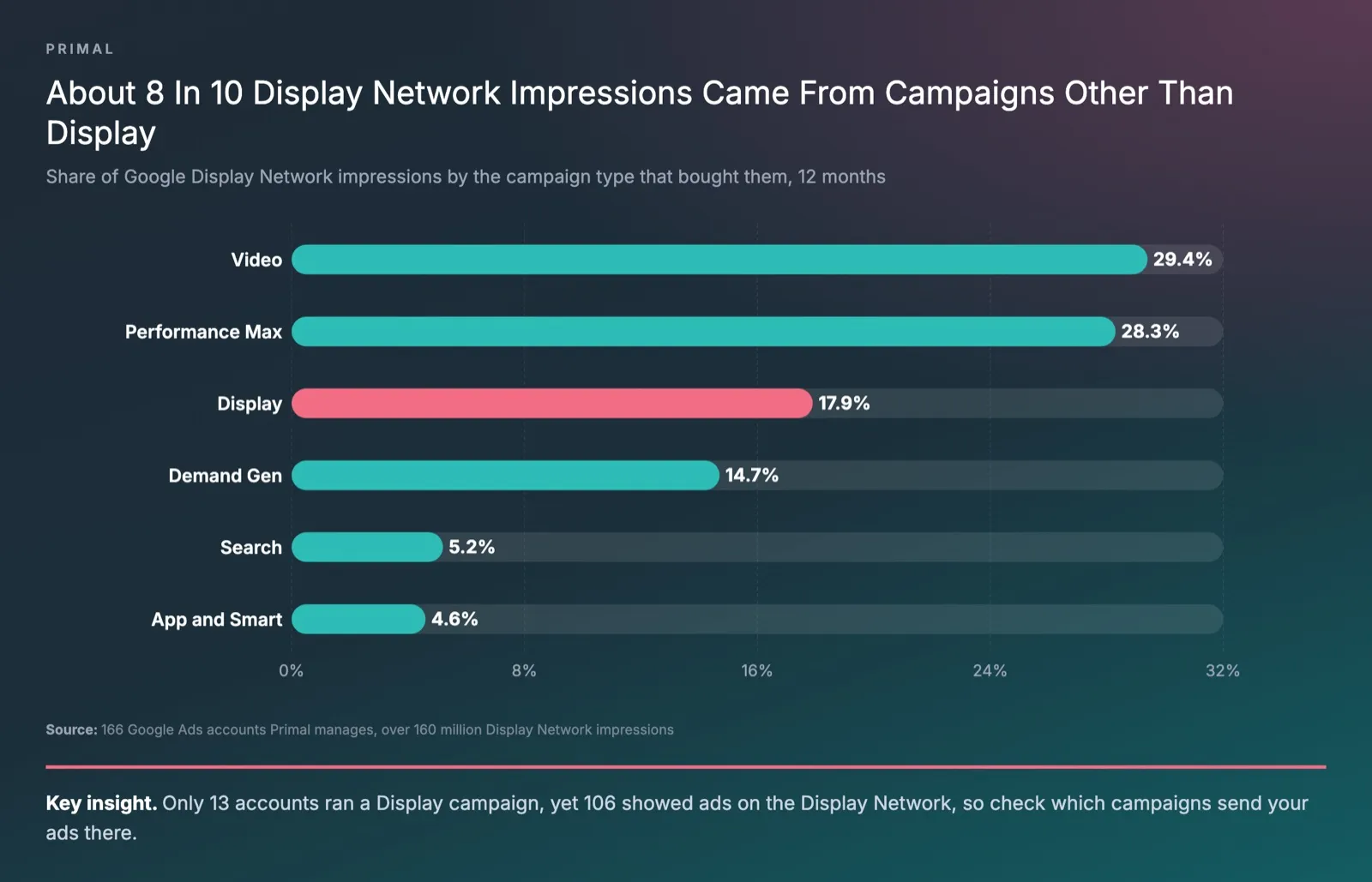
Performance Max took ads to the Display Network in 73 accounts, more than any other type. In Performance Max, Google decides how much of the budget goes to each channel, the Display Network included. You set the goal and give it the images and text.
Search campaigns in 31 accounts also showed ads on the Display Network. The Display Network option was on in their campaign settings. To keep a Search campaign on the results page only, turn that option off. Then give your display budget its own campaign, with targeting and images made for display.
What Demand Gen Is And What Happens To Display Campaigns
Demand Gen is a Google Ads campaign for image and video ads. One campaign can show on YouTube, Discover, Gmail, Maps and the Display Network. Google is bringing Display campaigns into Demand Gen, where they run as the Google Display Network in Demand Gen. The network stays the same, but the setup steps and some settings change.
Google began a phased roll-out of a migration tool in 2026-06. Eligible advertisers can use it in their Google Ads account to switch Display campaigns over. Later, new Display campaigns can only be made inside Demand Gen. Google will then migrate the remaining eligible campaigns itself. In Demand Gen, channel controls choose where a campaign shows. Google recommends keeping a migrated campaign on the Display Network only.
Some Display settings do not carry over. This table sums up Google’s page.
| In a Display campaign | In Demand Gen |
|---|---|
| Manual cost-per-click (CPC) bids | Not offered, use target CPC |
| Viewable cost-per-mille (vCPM) bids | Not offered, use Maximise clicks |
| Paying per conversion | Not offered, use target cost per acquisition (CPA) |
| Content exclusions per campaign | Account level only |
| Uploaded HyperText Markup Language 5 (HTML5) banners | Planned for late 2026 |
| Shows on the Display Network, YouTube and Gmail | Adds Discover and Maps (Maps in beta) |
If you run Display campaigns now, use Google’s tool rather than copying them by hand. The tool carries 42 days of performance history into the new campaign, and Google says this cuts the learning time to about 1 to 2 days. A copy made by hand starts with no history. A migrated campaign cannot go back to Display. Every ad also needs Google’s approval again. Demand Gen also needs a business logo. So switch well before a busy period for your brand.
Display Network Ad Formats And Banner Sizes
The Display Network takes responsive display ads and uploaded banners. Google makes responsive display ads from the images, headlines, text and logo you upload. Uploaded banners are finished designs that you upload as image files. These are often called GDN banners.
Responsive Display Ads
Display campaigns use responsive display ads by default. Google changes the size, look and format of the ad to fit each space, so one set of assets can fill almost any space. Google’s spec page sets these limits.
| Asset | Size or length | How many |
|---|---|---|
| Headline | Up to 30 characters | 1 to 5 |
| Long headline | Up to 90 characters | 1 |
| Description | Up to 90 characters | 1 to 5 |
| Business name | Up to 25 characters | 1 |
| Horizontal image, 1.91:1 | 1200 x 628 pixels (at least 600 x 314) | 1 to 15 |
| Square image, 1:1 | 600 x 600 pixels (at least 300 x 300) | 1 to 15 |
| Logo, 1:1 | 1200 x 1200 pixels (at least 128 x 128) | 1 to 5, optional |
| Logo, 4:1 | 1200 x 300 pixels (at least 512 x 128) | 1 to 5, optional |
Google recommends about 5 horizontal and 5 square images. In Demand Gen the business logo is required. Google’s Demand Gen asset page also takes portrait images in 4:5 and 9:16.
Uploaded Banners
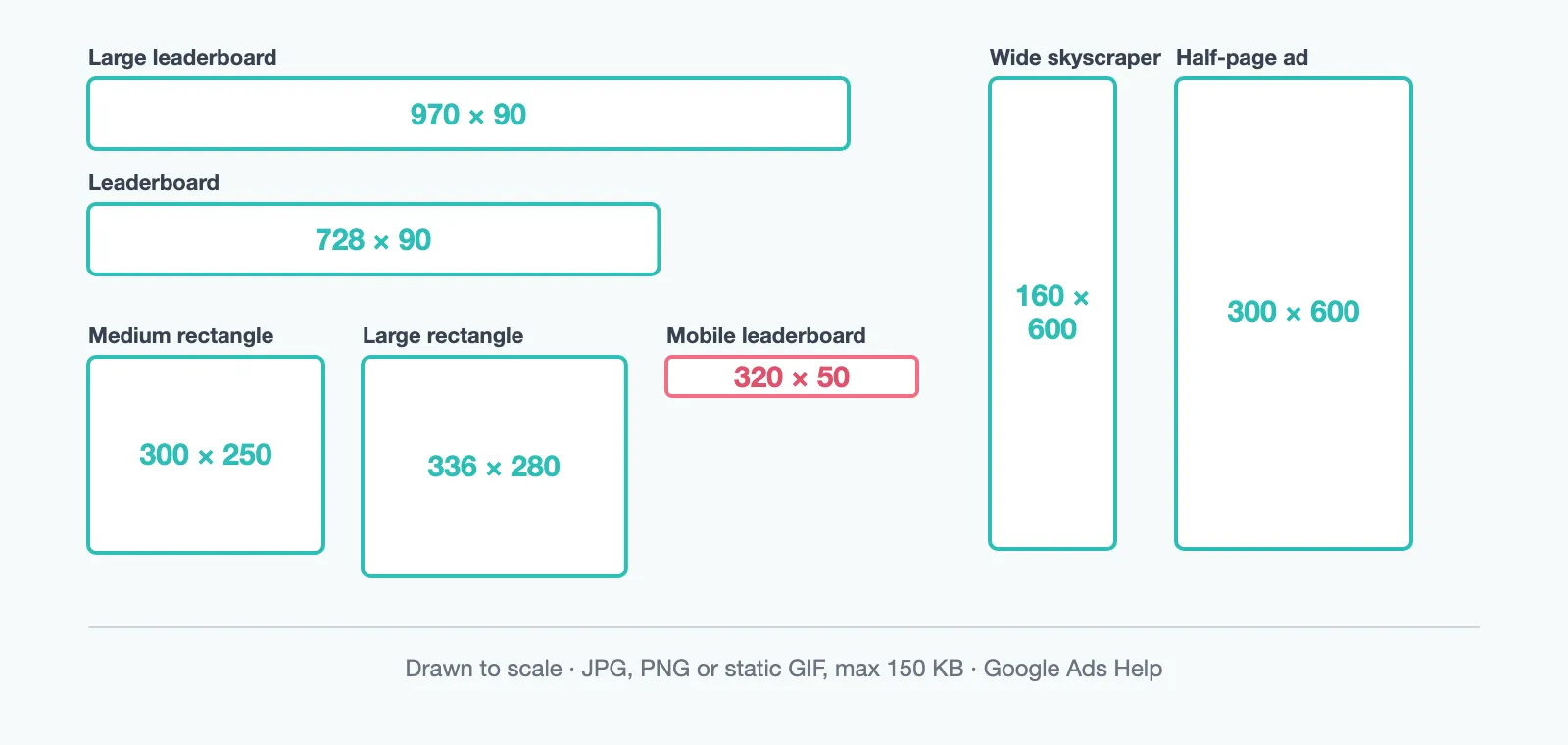
Uploaded banners give you full control of the design. But each one can only show where the space matches its size. Google’s Demand Gen asset page lists 7 common and recommended sizes. Each file must be a JPG, a PNG or a still GIF, at most 150 kilobytes (KB).
The diagram draws all 7 sizes to scale. The 320 x 50 banner is made for phones, and the 160 x 600 and 300 x 600 banners are the tall ones.
If your design team is short of time, start with responsive display ads. Make the full set of banner sizes when the brand needs full control of how the ad looks in every space.
How Display Network Targeting Works
Display Network targeting picks who sees your ad. Some options pick the person, and others pick the page, app or video they are on. You can use both in the same ad group.
These are the options that pick the person.
- Affinity segments are people with a lasting interest, such as travel or fitness.
- In-market segments are people researching a product or service like yours right now.
- Life events and detailed demographics reach people at a stage of life, such as those about to marry or just out of school.
- Custom segments are made from the keywords, websites and apps your customers use.
- Your data segments are people who visited your site, used your app or bought from you.
The options that pick the content are keywords, topics and placements. Keywords find pages about the words you choose. Topics pick a category of content, such as property or finance. Placements are the sites, apps or YouTube channels you choose yourself.
Display campaigns turn on optimised targeting by default. It uses information such as the keywords on your landing page to find new people who are likely to convert. So the segments you choose are a starting point, and your ads can reach people outside them. Google’s page on optimised targeting says it can go beyond the age and gender you chose. If you want the ads to stay with your own segments, turn it off in the ad group settings.
Remarketing On The Display Network
Remarketing shows ads to people who visited your website or used your app. Google Ads now calls these lists your data segments.
Google’s page on your data segments says a list needs at least 100 active visitors or users in the last 30 days. A smaller list cannot show ads on the Display Network. People stay on a list for 30 days by default, and for up to 540 days.
A site with few visitors should start with one list of everyone who visited. Once each page has enough visitors, split the list by product page or by step to purchase.
How Display Network Pricing Works
Display Network ads are priced in an auction each time an ad space opens. You choose what to pay for. You can pay per click or pay for impressions that people can see. You can also let Smart Bidding bid for conversions, at a target cost or a target return on ad spend (ROAS).
Viewable CPM means you pay only for impressions where at least half of a display ad is on screen for 1 second or more. It suits campaigns where the goal is for people to see the brand. Display campaigns offer it, and Demand Gen does not.
Across the 100 accounts Primal manages with 10,000 or more Display Network impressions, the median CPM there was about 109 baht over the 12 months to 2026-09-30. The middle half of those accounts paid about 46 to 232 baht. Across client accounts, the price also differed by campaign type. Take the 68 accounts that reached the Display Network through Performance Max. Their median CPM there was about 3 times that of the 12 accounts that ran Display campaigns.
For the market price ranges before you set a budget, read how much Google Ads costs in Thailand.
How To Control Where Your Display Ads Appear
Google Ads controls where your ads appear through content suitability settings at account level. They cover YouTube, the Display Network and Google video partners. They do not cover App campaigns or YouTube sponsorships. You choose the inventory type that fits your brand.
- Maximum inventory shows ads anywhere that meets Google’s policies. It still leaves out highly sensitive content.
- Moderate inventory also leaves out strong swearing, staged violence and sexually suggestive themes.
- Limited inventory leaves out as much sensitive content as it can. Google warns that it may limit your reach.
You can also add placement exclusions for single places, such as a site, an app, a YouTube channel or a video. An account can exclude up to 65,000 of them. The exclusions apply on YouTube, the Display Network, Google video partners and search partners.
Check the device split too, because nearly all Display Network clicks come from phones. In the 166 client accounts over the 12 months to 2026-09-30, phones had 82% of the Display Network impressions and 94% of the clicks. The chart compares the median click-through rate (CTR), the share of impressions that get a click, on each device across the 74 accounts with enough data on all three.
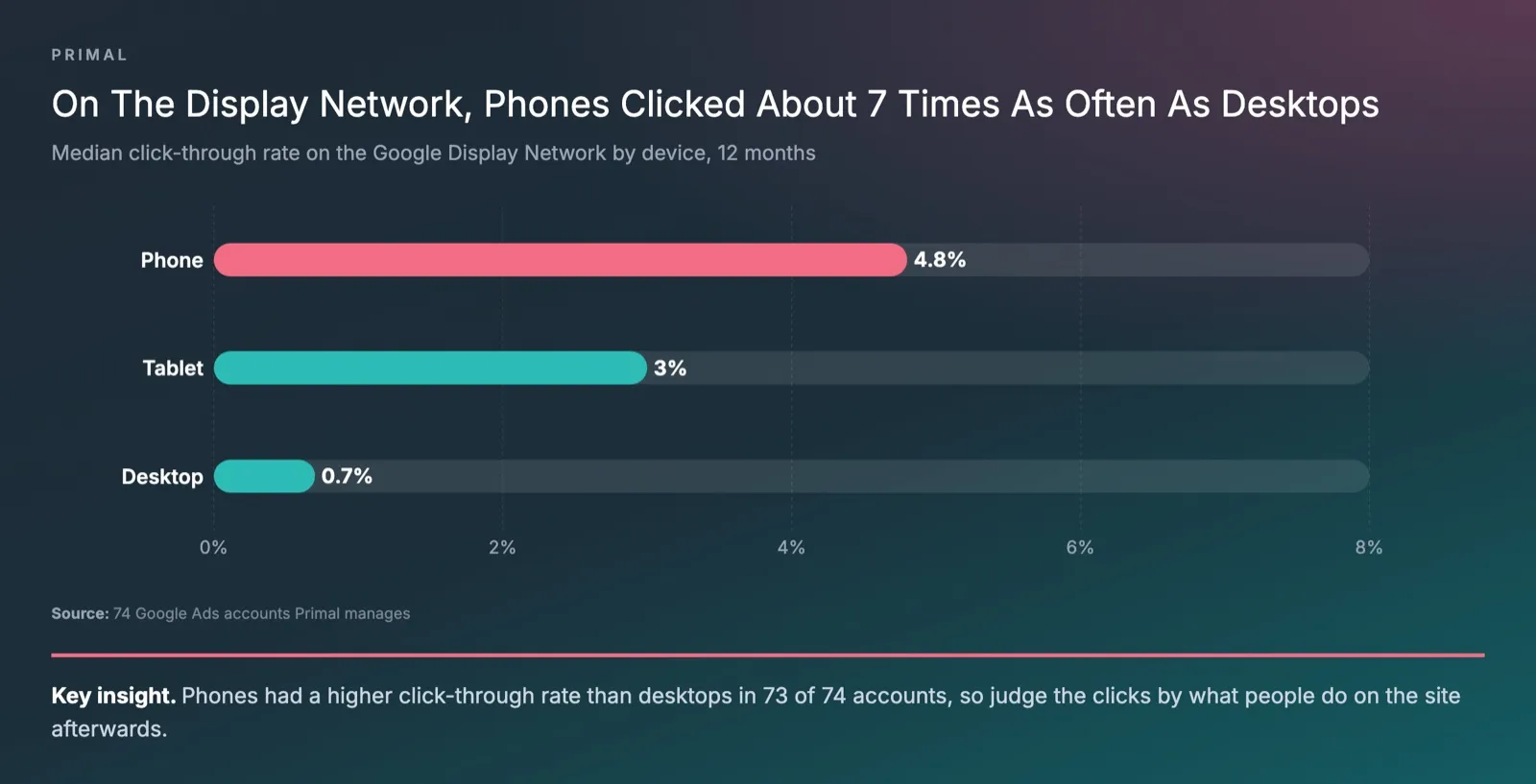
Phones had a higher CTR than desktops in 73 of the 74 accounts. A high CTR does not prove the clicks are worth paying for. Before you give phones more budget, check how long people who click from apps stay on your site, and whether they convert. If a group of apps sends clicks that leave at once, exclude that group.
Do these checks each month on any account with ads on the Display Network.
- Open the “Where ads showed” report for your Display, Demand Gen and Performance Max campaigns.
- Compare time on site and conversions from phone and desktop clicks in Google Analytics 4.
- Exclude sites and apps that do not suit your brand at account level, so the list covers every campaign.
- Check that no Search campaign has the Display Network option on by mistake.
- Check that the inventory type in content suitability fits your brand.
Mark McDowell, who founded Primal, would start a Display Network review with the device split. Across the 166 client accounts above, in the 12 months to 2026-09-30, phones took 94% of Display Network clicks, and phones had a higher click-through rate than desktops in 73 of the 74 accounts with enough data. A high click rate on its own says little, so I would judge phone clicks by what those visitors do on the site afterwards. I would also open every Search campaign, because in 31 accounts the Display Network option was on in the campaign settings.
Primal plans and runs Display Network campaigns, from the campaign type and the ads to the list of places to exclude. See our display advertising service for how the team works.
Frequently Asked Questions About GDN
Who Should Use The Display Network
The Display Network suits a new brand that needs people to know it before they search. It also suits a brand with a new product, or a business with enough site visitors for remarketing. If your customers already search for what you sell and your budget is small, start with Search. Add the Display Network for remarketing once your lists are big enough.
How Long Display Network Ads Take To Show Results
Changes to bids, budget or targeting can take 12 to 24 hours to apply. A new campaign then goes through a learning phase that usually lasts 5 to 7 days. Google advises waiting at least 7 to 14 days after a change before you judge the campaign or change it again.
Can You Track Leads And Orders From Display Network Ads
Yes, once conversion tracking is set up in Google Ads. Campaigns that show on the Display Network then record the leads or orders that follow a click on an ad. Smart Bidding can then bid toward a target CPA. Judge the campaign by the cost of each lead or order, not by the number of clicks.
Content Writer
Pimlapat Phansuathong is a Content Writer at Primal with over 6 years of writing experience. She writes search engine optimisation (SEO) content, from search intent and keyword research to the structure of each article. She joined Primal in 2022.
About The Author