

By Pimlapat PhansuathongPosted: Updated: 14 min read
What Is Google Ads And How Does It Work
Google Ads is Google's online advertising programme. Businesses bid to show ads on Google Search, YouTube, Gmail, Maps, Discover and partner sites and apps, and most campaigns pay per click. There are 7 main campaign types, Search, Performance Max, Demand Gen, Display, Video, Shopping and App, and your goal decides which one fits.
Key Takeaways
- Google Ads has 7 main campaign types, Search, Performance Max, Demand Gen, Display, Video, Shopping and App, and Google is bringing Display campaigns into Demand Gen.
- Of the 166 Google Ads accounts Primal manages, 150 ran Search campaigns over the 12 months to 2026-09-30, and about half ran one campaign type only.
- In the 71 accounts that ran both Search and Performance Max, a Search click cost about 5 times a Performance Max click at the median, so compare the two by the cost of a lead or an order.
- Ad Rank decides whether and where an ad shows, from the bid, the quality of the ad and landing page and other factors, and Google says Quality Score is not an input in the auction.
- Accounts with a billing address in Thailand that have not added a 13-digit Thai VAT registration number pay 7% VAT on top of their ad costs.
What Is Google Ads
Google Ads is Google’s online advertising programme. A business pays to show ads to people who search for, watch or browse something close to what it sells. The ads can appear on Google Search, YouTube, Gmail, Google Maps, Discover and the sites and apps that partner with Google. Each time there is a place for an ad, Google runs an auction among the advertisers who want it.
Most campaigns pay only when someone clicks. That is why Google Ads is called pay-per-click (PPC) advertising. Each business sets its own budget.
Google offers 7 main campaign types, but most of the accounts we see use one or two. Of the 166 Google Ads accounts Primal manages, 9 in 10 ran Search campaigns over the 12 months to 2026-09-30. About half ran a single campaign type. So start with the searches your customers type, and add Performance Max once conversion tracking works. Judge every campaign by the cost of a lead or an order.
What Google Ads Is Used For
Google Ads is used to win customers who are searching for what you sell. It is also used to show a brand to new people through video and images. When you create a campaign, Google asks for a goal first. The goals are online sales, leads, website traffic, app promotion, local store visits and promotions, and YouTube reach, views and engagements.
The goal you pick decides which campaign types Google suggests. Businesses whose customers search before they buy usually start with Search. Clinics, property developers and repair services are good examples. A product people do not know they want yet, such as a new brand, usually needs video or images so people see it first.
Types Of Google Ads
There are 7 main types of Google Ads campaigns. They are Search, Performance Max, Demand Gen, Display, Video, Shopping and App. Each one shows ads in different places and needs different material from you. Google’s guide to choosing the right campaign type says to pick by your marketing goal and the time you can give the campaign.
| Campaign type | Where the ads show | What you need | Best for |
|---|---|---|---|
| Search | Google search results and search partner sites | Keywords and text ads | Online sales, leads and website visits from people searching now |
| Performance Max | Search, YouTube, Display, Discover, Gmail and Maps in one campaign | A conversion goal, images, text and video | Online sales or leads you can measure |
| Demand Gen | YouTube including Shorts, Discover, Gmail, Maps and the Google Display Network | Images, videos or a product feed | Interest from people who are not searching yet |
| Display | Websites and apps in the Google Display Network | Images | Awareness, and ads to people who visited your site |
| Video | YouTube and video partner sites | A video uploaded to YouTube | Reach, views or conversions |
| Shopping | Search results and the Shopping tab | A Merchant Center account and a product feed | Shops that sell products online or in store |
| App | Search, Google Play, YouTube, Discover and partner sites and apps | The app you want to promote | App installs and actions inside the app |
Google also has Smart campaigns, made for small businesses that want a quick setup, and Hotel campaigns for places to stay. Older guides list Remarketing, Local and Discovery as campaign types too. None of the three is a campaign type today. Remarketing means showing ads to people who visited your site or used your app. You set it up inside Display and other campaigns. Local store visits are a goal you reach through Performance Max, and Discovery became Demand Gen.
What A Search Campaign Is
A Search campaign shows text ads in Google’s search results when someone searches for words that match your keywords. Google suggests it for online sales, leads and website traffic. The ad reaches people who are already looking for the product or service. You only need ad text and keywords, with no images or video.
What Performance Max Is
Performance Max is one campaign that shows your ads on every Google Ads channel, which are YouTube, Display, Search, Discover, Gmail and Maps. You give it images, text, video and a conversion goal. Google’s artificial intelligence (AI) then decides where each ad shows and how much to bid. With a Merchant Center product feed, it shows product ads as well.
Google designed Performance Max to sit beside your Search campaigns. When a search is identical to an exact match keyword in a Search campaign, Google uses the Search campaign first. Performance Max learns from whatever the account records as a conversion. If page views are set as conversions, it brings you page views. So record only form leads, calls and purchases as conversions.
What Demand Gen Is And Where Display Campaigns Are Going
Demand Gen is a campaign of image and video ads. It shows on YouTube including Shorts, Discover, Gmail, Maps and the Google Display Network. It is made to reach people who are not searching yet and get them interested enough to click. Discovery campaigns, which many people still search for, became Demand Gen in an upgrade Google began in 2023.
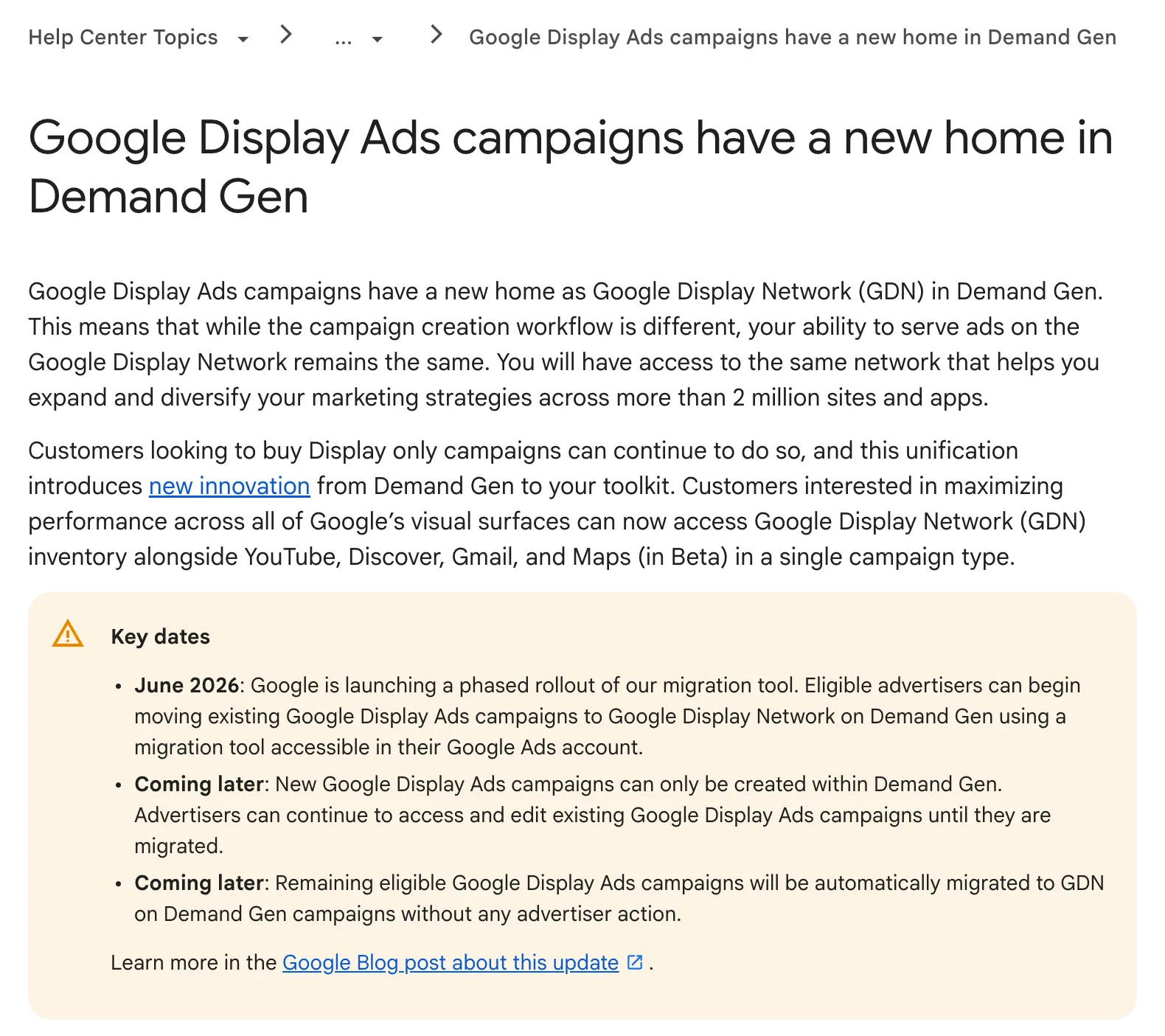
Google is also bringing Display campaigns into Demand Gen, where they run as the Google Display Network (GDN). Advertisers can switch existing Display campaigns with a migration tool in their account. Later, new Display campaigns can only be made inside Demand Gen, and Google will migrate the rest itself. The ads still reach more than 2 million sites and apps. Google’s English help page sets out the key dates.
How Shopping, Video And App Campaigns Differ
These three differ by what you promote, a product, a video or an app. Shopping campaigns show a product’s picture and details in search results and the Shopping tab. They need a Merchant Center account with a product feed. Video campaigns show video ads on YouTube and partner sites, and the video has to be on YouTube first.
Google offers 6 kinds of Video campaign, from campaigns for reach to campaigns that drive conversions. App campaigns promote an app on Search, Google Play, YouTube, Discover and over 3 million sites and apps. Google writes and tests the ads itself, using information from the app.
Which Google Ads Campaign Types Businesses Run
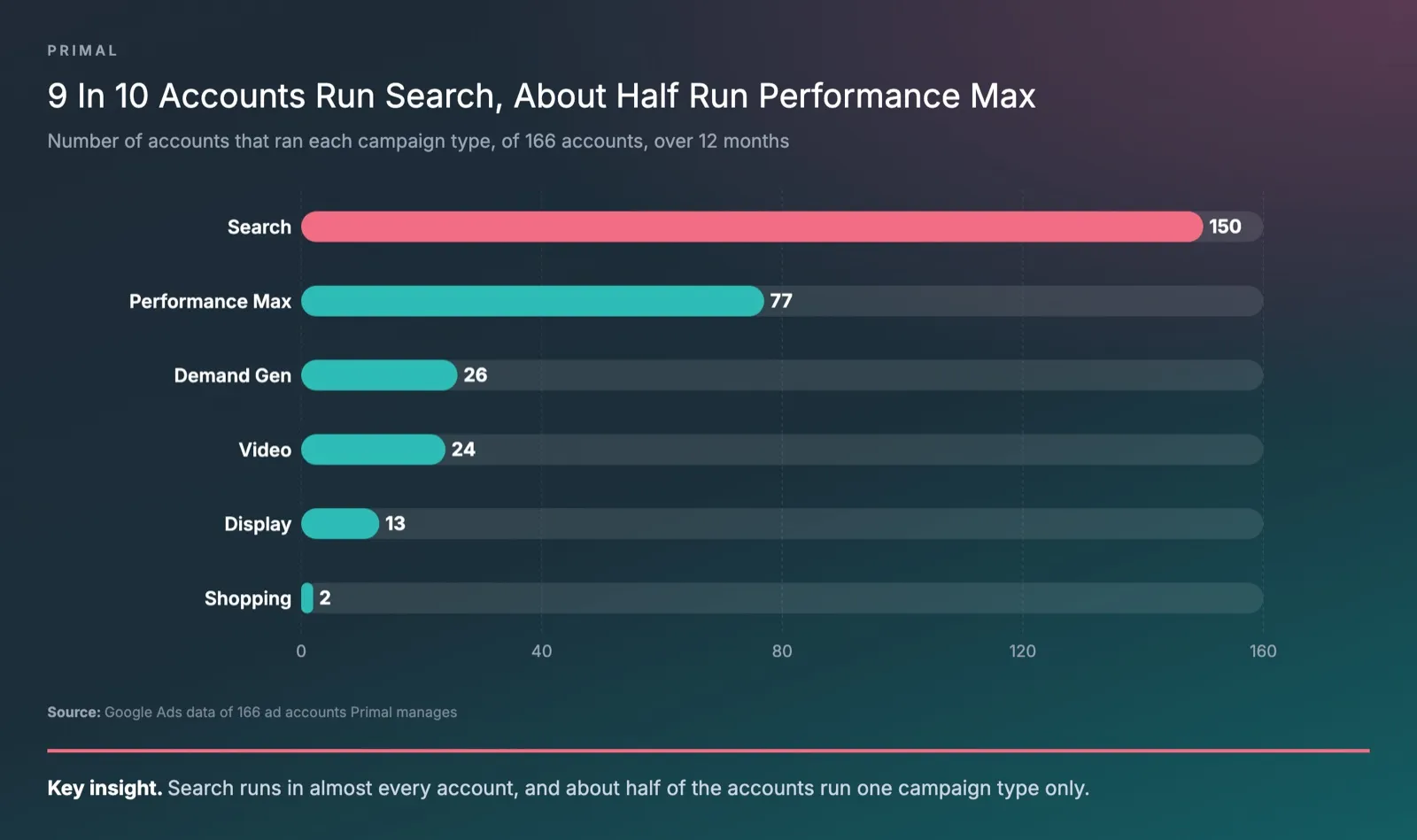
Most businesses in our data run Search, and many run nothing else. Of the 166 Google Ads accounts Primal manages, 150 ran Search campaigns in the 12 months to 2026-09-30. Search took the largest part of the budget in 138 of them. About half, 82 accounts, ran only one campaign type.
| Campaign type | Accounts that ran it (of 166) | Share of total spend |
|---|---|---|
| Search | 150 | 69% |
| Performance Max | 77 | 21% |
| Demand Gen | 26 | 6% |
| Video | 24 | 3% |
| Display | 13 | 1% |
| Shopping | 2 | under 1% |
The most common setups were Search alone in 68 accounts and Search with Performance Max in 46. App, Smart and Hotel campaigns ran in 1 account each. Only 2 accounts ran a separate Shopping campaign. Shops can also show product ads through Performance Max with a Merchant Center feed. The chart shows how many accounts ran each type.
The price of a click differs a lot between types. Take the 71 accounts that ran both Search and Performance Max with at least 100 clicks on each. In those, a Search click cost about 5 times a Performance Max click at the median. Search was the dearer click in about 9 in 10 of them.
The shares of budget and clicks agree with this. Across the 70 accounts Primal manages that ran both Search and Performance Max with 1,000 or more impressions on each, the median account spent 27% of its Google Ads budget on Performance Max, 12 months to 2026-09-30. The middle half of accounts sat between 15% and 38%. In the same 70 accounts, Performance Max produced a median 60% of the account’s clicks, 12 months to 2026-09-30. The chart shows both medians.
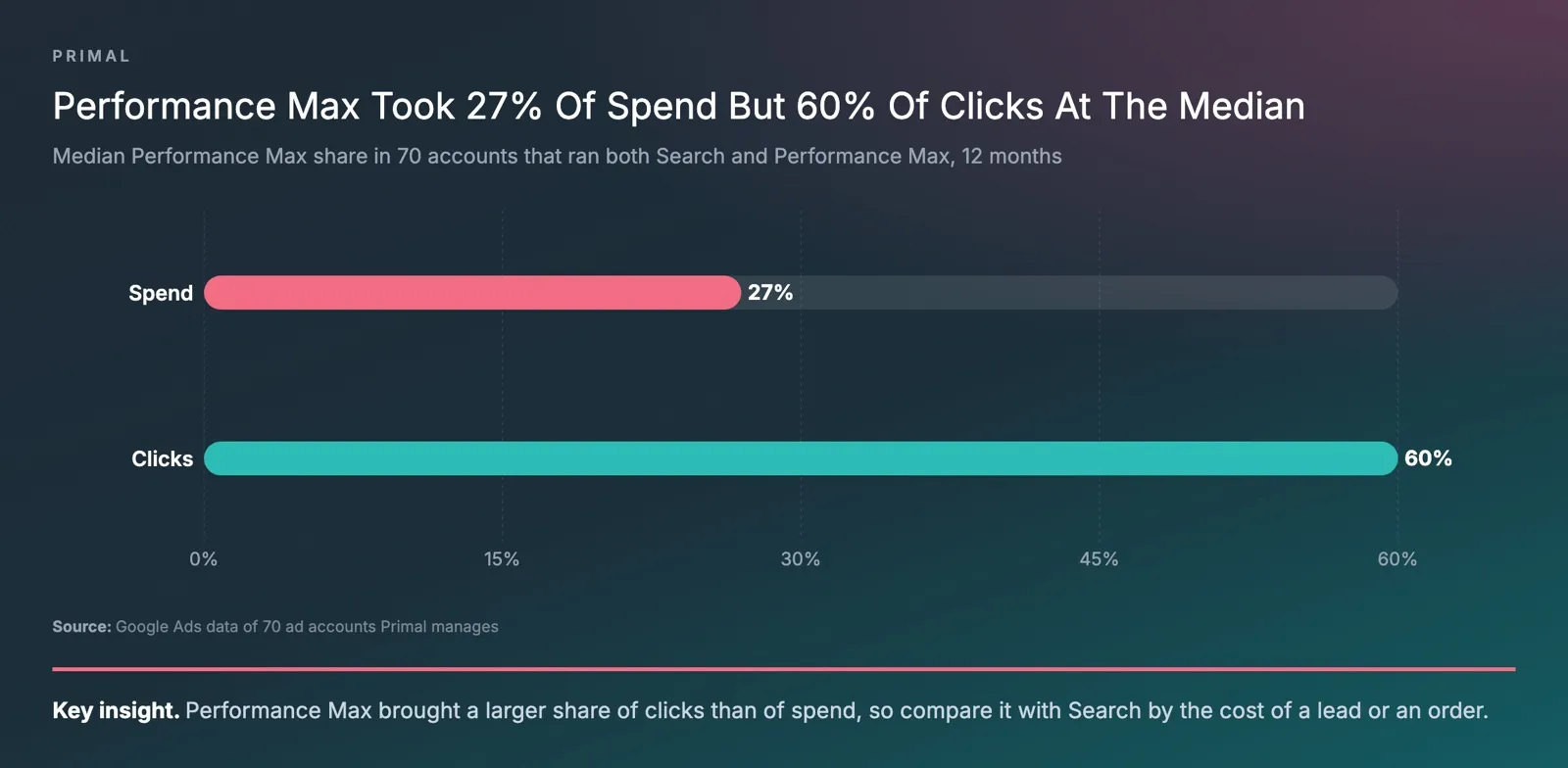
A cheaper click can still cost more per customer. A Search click comes from someone who typed what you sell. Performance Max shows ads far more widely, and some of its clicks come from YouTube and Display Network sites, where people may not be ready to buy yet. So compare Search and Performance Max on the cost of each lead or order they bring, because the click price on its own tells you little.
Mark McDowell, who founded Primal, adds Performance Max to a Search-only account only when Search cannot use any more budget. If the Search campaigns already reach the searches the business needs and spend the whole budget, I do not recommend it. Performance Max comes in when those searches are covered and budget is left, because it reaches people across Google’s properties who do not know the brand yet. That wider reach brings in some lower-quality leads, so it needs ads made for each audience and a landing page that says clearly who the business is and asks a little more of people before a lead reaches the client’s team.
How Does Google Ads Work
Google Ads works as an auction that runs each time someone searches or a page has room for an ad. For each advertiser, Google works out an Ad Rank, which decides whether the ad can show and in which position. Google’s Ad Rank page lists 6 factors.
- Your bid.
- The quality of your ad and landing page.
- The minimum Ad Rank an ad needs to show.
- How strong the competition is in that auction.
- The context of the search, such as the person’s location, device and time of day.
- The expected effect of your ad assets.
Ad assets, which Google used to call extensions, add links, a phone number or a location to an ad. Google includes their expected effect when it works out Ad Rank.
Customers often ask us whether the competitor with the bigger budget always takes the top spot. It does not. The same page says an advertiser with a lower bid can still win a higher position at a lower price. The way to do it is with more relevant keywords and ads.
You also pay less than your bid most of the time. Google’s page on the actual cost per click (CPC) explains why. You pay only what you need to clear the minimum Ad Rank and beat the advertiser directly below you. With no one below you, you pay the reserve price.
What Quality Score Is
Quality Score is a rating from 1 to 10 that Google gives each keyword in a Search campaign. It shows how relevant your ad and landing page are to the people searching, compared with other advertisers. Google’s Quality Score page says it comes from 3 parts, expected click-through rate, ad relevance and landing page experience. Each part is compared with the advertisers who showed for the same search over the last 90 days.
The same page says “Quality Score is not an input in the ad auction”. It is a diagnostic tool. The auction uses the quality of your ad and landing page at that moment, and Quality Score shows you where to work. If a part reads below average, fix that part first. Write ad text that matches the keyword, or make the landing page answer the search and load fast on a phone.
Keyword Match Types And Negative Keywords
A keyword’s match type sets how close a search has to be to your keyword for your ad to enter the auction. Google’s page on match types lists 3 of them.
- Broad match is the default for every keyword. Your ad can show on searches related to the keyword, even when they do not contain its words. Google says to use it with Smart Bidding, its automated bidding.
- Phrase match puts the keyword in quotation marks, such as “tennis shoes”. Your ad can show on searches that include the meaning of the keyword.
- Exact match puts the keyword in square brackets, such as [red shoes]. Your ad can show on searches with the same meaning or intent, and it reaches the fewest searches of the three.
A negative keyword stops your ad from showing on searches that contain that term. Google’s example is a hat shop that does not sell baseball hats, which adds baseball hats as a negative keyword. Our guide to keyword research covers how to find keywords and check how often people search for them.
How Google Ads Charges You
Google Ads charges for what the campaign bids on. Search campaigns usually pay per click. Awareness campaigns on YouTube and the Display Network can pay per 1,000 impressions, called cost per mille (CPM). Video campaigns for views can pay per view, called cost per view (CPV), says Google’s page on bidding.
You set an average daily budget for each campaign. For most campaigns, Google can spend up to 2 times that amount on a busy day. Over a month, it charges no more than 30.4 times the daily budget. Take a made-up daily budget of 1,000 baht. One day could cost up to 2,000 baht, and the month would cost no more than 30,400 baht. The 1,000 baht is only there for the sum and is not a budget we recommend.
Real click prices vary a lot by industry, keyword and ad quality. Our post on how much Google Ads cost in Thailand covers the published price ranges and what pushes the cost up or down.
How To Pay For Google Ads In Thailand
Google Ads takes payment by itself when the account uses automatic payments. Google’s billing glossary lists 3 payment settings.
- With automatic payments, Google charges your card or account on a set date, or when your costs reach a set amount.
- With manual payments, you add money to the account first, and your ads spend from that balance.
- With monthly invoicing, accounts that qualify get one invoice a month and pay by cheque or bank transfer.
Payment methods for Google Ads differ by country, currency and payment setting. An account with a billing address in Thailand that pays in baht can prepay through TrueMoney Wallet. Only a credit card can be set as a backup payment method.
Google’s page on taxes lists Thailand under Google Asia Pacific Pte. Ltd. It says accounts with a billing address in Thailand pay 7% value added tax (VAT). The tax is not charged once the account adds a 13-digit Thai VAT registration number to its payments profile. A business registered for VAT adds the number under Billing, then Settings, then Thailand Tax Info. Accounts on monthly invoicing ask Google’s support team to add it.
Why Your Google Ads Are Not Showing
Ads that do not show, or show rarely, usually have one of 4 causes. The daily budget is small, the targeting is too narrow, the Ad Rank is below the competition, or the ad is still waiting for approval. Google’s troubleshooting page for Search campaigns adds one more. A campaign on automated bidding may show fewer ads when it has too little conversion data or broken tracking.
Check the column for Search lost impression share due to rank to see how often your ads lose the auction. If that number is high, improve the bid, the ad or the landing page before you add budget.
Customers often ask us why they cannot see their own ad when they search on Google. Use the Ad Preview and Diagnosis tool in the account instead of searching yourself. It tells you why an ad does not show for a given search. The tool runs one simulated auction, so read it alongside the real impressions and clicks in your account.
What You Need Before You Start Google Ads
Before you start Google Ads, you need a goal you can measure, conversion tracking and a landing page that answers the search. Use this list before your first campaign goes live.
- One measurable goal, such as form leads, calls or orders.
- Conversion tracking that is installed, tested and set to record only the actions that matter to the business.
- A landing page that matches the search and loads fast on a phone.
- A list of the keywords your customers use, with negative keywords for the searches you do not want.
- Location targeting set to the areas you serve, such as Bangkok only for a clinic with one branch.
- A choice of ad account, either one in the business’s name or the agency’s. Both options exist, the right one depends on the business, and the ad budget is billed apart from the agency’s fee either way. If the account is in the business’s name, add its VAT registration number.
- Time for automated bidding to learn before you judge the results.
Google Ads Or SEO
Google Ads buys a place at the top of the results straight away. The ads stop when the spending stops. Search engine optimisation (SEO) earns a place in the regular results without paying per click. It takes longer to show results.
Many businesses run Google Ads to win customers while their SEO rankings grow.
Our Bangkok office runs Google Ads campaigns for brands in Thailand. The team sets up the account structure and conversion tracking, and picks the campaign type for each goal. Primal is a Google Premier Partner.
Frequently Asked Questions About Google Ads
Is There A Minimum Budget For Google Ads
No. Google’s definition of Google Ads says there is no minimum spending commitment, and you set your own budget. The budget that works depends on the click prices in your industry and on how many conversions the campaign needs while it learns. Our cost post covers the published price ranges.
Customers Often Ask Us How Google Ads Differs From Facebook Ads
Google Ads shows ads when people search for what they want. Facebook ads show in the feed, based on interests and audience data. So a Search click comes from someone who already has a need.
Businesses whose customers search before they buy usually start with Google Ads. For a product people have not heard of yet, feed ads on Facebook can make it known before anyone searches for it.
Customers Often Ask Us Whose Name The Account Should Be In
There are 2 options. The ads can run in an ad account in the business’s name, or in the agency’s ad account. Which one fits depends on the business. Either way, the ad budget is billed apart from the agency’s fee.
Customers Often Ask Us How Fast Google Ads Works
Ads can start to show once they pass Google’s review. Automated bidding then needs time to learn. Google’s page on Smart Bidding learning says a “Learning” status shows for up to 7 days after a big change, such as a new bid strategy. Performance usually reaches the new goal within 1 to 2 conversion cycles, the time it takes a click to become a conversion. Google then advises judging results over 2 conversion cycles or 2 weeks, whichever is longer.
Is Google Ads The Same As Google AdWords
Yes. Google AdWords was the old name, and Google changed it to Google Ads in 2018. By then its ads ran on YouTube, Maps, Google Play and partner sites as well as in search results. Guides and courses that still say AdWords often describe old screens and campaign types.
How Google Ads Differs From Google AdSense
Google Ads is for advertisers who pay to show ads. Google AdSense is for website owners. Google’s AdSense help page says it lets them earn money by showing those ads on their pages. A business that wants customers uses Google Ads, and a publisher that sells ad space uses AdSense.
Content Writer
Pimlapat Phansuathong is a Content Writer at Primal with over 6 years of writing experience. She writes search engine optimisation (SEO) content, from search intent and keyword research to the structure of each article. She joined Primal in 2022.
About The Author