

By Pimlapat PhansuathongPosted: Updated: 16 min read
How To Run Facebook Ads Step By Step In Ads Manager
To run Facebook ads, create a campaign in Meta Ads Manager, which works at 3 levels. Pick 1 of 6 objectives for the campaign, set the audience, placements and budget in the ad set, then add the image or video, text and link in the ad. The types are the 6 objectives and the 4 formats, which are flexible, single image or video, carousel and collection.
Key Takeaways
- Meta Ads Manager has 6 objectives, Awareness, Traffic, Engagement, Leads, App promotion and online sales, and the objective you pick decides which formats and placements you can use.
- Pick the objective for the result you will judge the campaign on, because Meta shows the ad to the people most likely to take that action, and a cheaper impression says little about the cost of a lead or an order.
- An ad set usually leaves the learning phase after about 50 results in the week after its last significant edit, so the budget has to pay for about 50 results a week.
- Ad accounts set to Thailand and the Thai baht can pay with PromptPay, KBank KPlus or TrueMoney, but only if that method is chosen when the ad account is first set up.
- Meta does not allow alcohol ads in Thailand, and a Thai food ad that states a benefit, quality or property needs approval from the Food and Drug Administration before it runs.
How To Run Facebook Ads Starts With The Objective
Running Facebook ads takes 3 choices in Meta Ads Manager. You pick an objective for the campaign, then set the audience, placements and budget in the ad set. Last, you add the image or video, the text and the link in the ad. The first choice matters most, because Meta shows the ad to the people most likely to do what the objective asks for.
At Primal we set the objective from the result the business will judge the campaign on. For a business that follows up each enquiry, that is the Leads objective, set to an action on its website such as sending a form. Meta then looks for the people most likely to send their details.
The cost of 1,000 impressions is called CPM (cost per mille), and the cost of one click is called CPC (cost per click). Both change with the objective. A Leads campaign often pays more for an impression than a Traffic campaign, because Meta looks for a smaller group of people who are likely to get in touch.
The price of an impression says little about the price of a customer. Judge a campaign on its cost per result, such as the cost of a lead or an order.
So if you want leads, pick the Leads objective. Set up the Meta Pixel so Meta can see each form people send. Then judge the campaign on the cost of each lead.
What Types Of Facebook Ads Are There
Facebook ads have 2 kinds of type. The objective is the result you ask Meta to find, and there are 6. The format is the layout of the ad, and Ads Manager offers 4.
Stories, Reels and Messenger are placements, the places where an ad appears. Lists of Facebook ad types often put them next to the formats.
The 6 Facebook Ad Objectives And When To Use Each
Meta Ads Manager has 6 objectives. They are Awareness, Traffic, Engagement, Leads, App promotion and online sales, which Ads Manager shows last in the list. Meta’s page on choosing an ad objective says what each one is for and which older objectives it replaced.
| Objective | What Meta says it does | Pick it when |
|---|---|---|
| Awareness | Shows the ad to the most people likely to remember it | A new brand, a new name or a launch needs to be seen |
| Traffic | Sends people to a website, app, Page or shop | You want visits and will judge the results on your site |
| Engagement | Finds people likely to engage, send a message or act on your ad or Page | You want chats in Messenger or video views |
| Leads | Collects leads through messages, calls or sign-ups | You sell a service and follow up each enquiry |
| App promotion | Gets people to install your app or act inside it | You have an app in the stores |
| Online sales | Finds people likely to buy, or to add an item to the cart | You sell online and the Pixel records each purchase |
The objective also decides which formats and placements you can use. Old objectives such as Conversions now sit inside Engagement, Leads and online sales.
The 4 Ad Formats In Ads Manager
The 4 ad formats in Ads Manager are flexible, single image or video, carousel and collection, on Meta’s page about ad formats. Flexible lets Meta choose the mix from up to 10 images and videos. Single image or video also covers a slideshow of several images.
Collection pairs a main image or video with a row of product images. A tap opens an Instant Experience, a full-screen page that loads at once.
Make video as well as images for the same campaign, because Stories and Reels show the ad full screen and the feed takes both. Each placement needs its own size, and our guide to Facebook ad sizes lists them from Meta’s specs.
What Is A Carousel Ad
A carousel ad shows 2 or more images or videos in one ad, and people swipe through them. Each card has its own headline, description, link and button. A Facebook carousel holds up to 10 cards. Use it for a range of products, or to show one product step by step.
What You Need Before You Run Facebook Ads
You need a Facebook Page, an ad account and a way to pay. A business portfolio keeps the Page, the ad account and the people who work on them in one place. Set these up before you open Ads Manager, because some account settings cannot be changed later.
Do You Need A Facebook Page To Run Ads
Yes. Meta says an ad account needs a Facebook Page, or a role on someone else’s Page, and a valid payment method. The Page is the name and picture people see on the ad. You can add an Instagram account too, so the ad also shows your Instagram name.
What Is A Business Portfolio
A business portfolio is where Meta keeps a business’s Pages, ad accounts and Instagram accounts. It also holds the people who can use them. It was called Business Manager before Meta renamed it, and you need one to use Meta Business Suite.
Give each person only the access they need. Add a second admin, so the account stays with the business when one person leaves.
How To Pay For Facebook Ads In Thailand
Meta’s payment page for Thailand lists the ways to pay. They are bank transfer in the app, a credit card or co-branded debit card (Visa, MasterCard or American Express), and PayPal. KBank KPlus, PromptPay and TrueMoney also work. Meta calls these 3 manual payment methods.
The 3 local methods only work when the ad account’s country is Thailand and its currency is the Thai baht. You can also only add one when you first set up the ad account. To change the currency or the time zone later, you need a new ad account. So choose Thailand, the baht and the Bangkok time zone on the first day.
How To Set Up A Facebook Ad In Ads Manager, Step By Step
Ads Manager works at 3 levels. The campaign holds the objective. The ad set holds the audience, placements, budget and schedule. The ad holds the image or video, the text, the link and the button.
One campaign can hold several ad sets, and one ad set can hold several ads. The diagram shows what you set at each level.
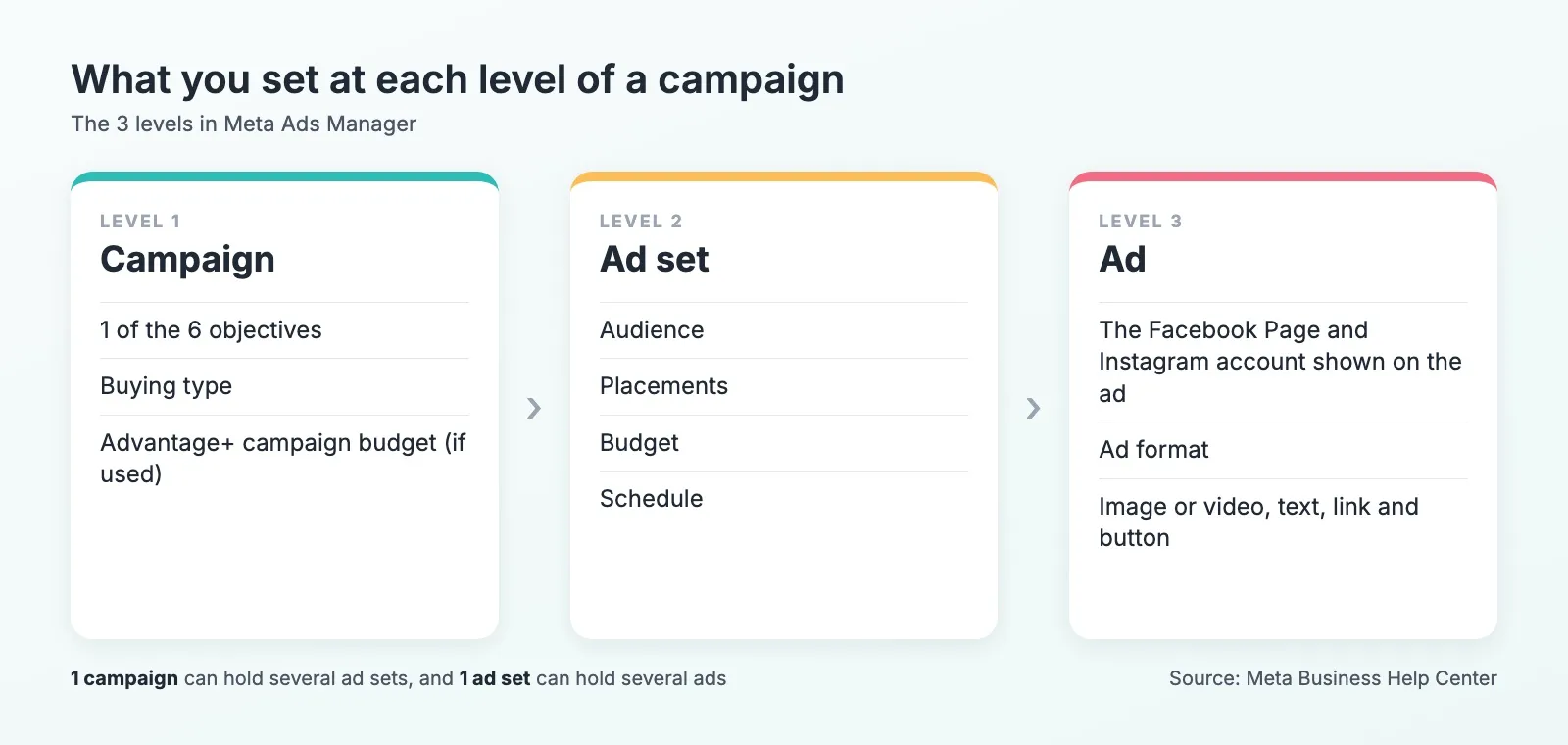
Follow these 8 steps for your first campaign.
- Open Ads Manager, click Create and pick 1 of the 6 objectives. Most advertisers keep the Auction buying type.
- Name the campaign. Choose whether one budget covers the whole campaign (Advantage+ campaign budget) or each ad set gets its own.
- In the ad set, choose where people go, such as your website, a chat, a call or an instant form. Choose the event the Pixel measures.
- Set the audience. Let Advantage+ audience find people, or set the location, age and interests yourself.
- Choose the placements. Meta recommends Advantage+ placements, where Meta chooses them, but you can also pick them by hand.
- Set a daily budget or a lifetime budget, with a start date and an end date.
- In the ad, pick the Page and Instagram account, the format, the image or video, the text, the link and the button. Write 2 or 3 versions of the main message to test.
- Check the preview in each placement and click Publish. Meta reviews the ad before it runs.
The video below is a 27-second Short from Mark McDowell, Primal’s chief executive, on finding leads on Meta.
In it, Mark explains how he finds leads at a lower cost on Meta.
Is Promoting A Post The Same As An Ads Manager Ad
Customers often ask us whether promoting a post from the Page is the same as an ad in Ads Manager. It is a simpler version. A promoted post starts from a post, Story or Reel you have already published, and it offers fewer goals and targeting choices. Ads Manager offers all 6 objectives and the full set of audiences.
Meta’s page comparing the two says campaign creation, budget settings and performance metrics are only in Ads Manager.
| Promoting a post | Ads Manager | |
|---|---|---|
| Starts from | A post, Story or Reel already published | A new ad, or an existing post used as the ad |
| Goals | Website clicks, Page engagement and local business promotion | All 6 objectives, including Leads, App promotion and online sales |
| Audience | Interests, age and gender | Custom and lookalike audiences and more detailed targeting |
| Formats | The post as it is | Carousel and the other formats, with several text versions |
| Budget and reports | A budget and a duration for the post | Campaign creation, budget settings and performance metrics |
Promote a post that already gets likes and comments when you want more people to see it, and start with a small budget. Use Ads Manager when you want leads or orders.
What Is A Dark Post
A dark post is an ad-only post that does not appear on your Page’s timeline. Meta calls it an unpublished Page post, and you make it in Ads Manager. It lets you test several messages on different audiences without filling your Page with near copies.
How To Choose An Audience For Facebook Ads
Customers often ask us how to reach the right people with Facebook ads. Start with Advantage+ audience, where Meta’s artificial intelligence (AI) finds people for the ad. You can add hints such as an age range or interests. Meta does not recommend it for retargeting, where a custom audience fits better.
If you set interests by hand, our Facebook Interest Finder shows Meta’s ad interests and the audience size Meta gives for each. Set the location, and the languages your customers use, such as Thai, English or both.
What Is A Custom Audience
A custom audience is a group of people who already know your business. You can make one from your website visitors through the Meta Pixel, or from your app users. A customer list you upload works too, and so do people who engaged with your Page, posts or ads.
Showing a second ad to people who visited but did not buy is called remarketing. We give remarketing its own campaign with its own budget. Then the money for people who already know the business does not compete with the money for new people, and each group is judged on its own cost per result.
What Is A Lookalike Audience
A lookalike audience is a group of new people who resemble a source audience, such as your customer list. Meta needs at least 100 people in the source and recommends 1,000 to 5,000. You choose a size from 1% to 10% of the people in the location, and a smaller percentage gives a closer match.
What The Meta Pixel And Conversions API Do
The Meta Pixel is code on your website that tells Meta when someone views a page, sends a form or buys. The Conversions API (application programming interface) sends the same events from your server instead of the browser.
Meta recommends using both. It drops the second copy of an event when both copies carry the same event name and event identifier. You create the Pixel in Events Manager.
Customers often ask us whether to send the value of each purchase as well. Send it if you sell online. With the value, Ads Manager can report the return on ad spend (ROAS), and Meta can aim for orders of higher value.
Meta can limit the data a health and wellness website shares. Meta’s page on health data says such a site may be stopped from sharing events lower in the funnel, such as purchases. Meta suggests events higher in the funnel, or the Awareness, Engagement and Traffic objectives.
Does iOS 14 Still Affect Facebook Ads
Not for the setup. Meta’s Aggregated Event Measurement still processes events from devices on iOS 14 and later, and no setup steps are needed now. Meta has removed its setup tab from Events Manager.
How Much To Spend And Which Bid Strategy To Pick
Set the budget from the cost of the result you want, then check it against the learning phase. You can set a daily budget, or a lifetime budget for the whole run. On a single day, Meta may spend up to 75% more than the daily budget. Over a week, it spends no more than 7 times the daily budget.
Is There A Minimum Budget For Facebook Ads
Yes, but Meta does not publish one figure in baht. The minimum depends on the country, the currency and the objective. Ads Manager shows an alert when a budget is too low. With a cost per result goal, Meta says the daily budget should be at least 5 times the goal.
Our post on the cost of Facebook ads in Thailand covers what campaigns cost.
Which Bid Strategy To Pick
Start with Highest volume, which spends the budget to get the most results. Meta has renamed 3 of its bid options. Lowest cost is now Highest volume, cost cap is now Cost per result goal, and minimum ROAS is now ROAS goal. Bid cap and Highest value keep their names.
We start a new campaign on Highest volume, because it has no cost history yet to set a goal from.
Switch to a Cost per result goal once a few weeks of data show what a result should cost. Use ROAS goal or Highest value only when the Pixel sends purchase values.
Why Results Drop After A Budget Change
Customers often ask us why leads drop after they raise the budget. A large change can send the ad set back into the learning phase, when Meta is still working out how to deliver the ad. An ad set usually leaves the learning phase after about 50 results in one week, on Meta’s page about the learning phase. The week starts at its last significant edit.
An edit during the learning phase resets it. A significant edit is a change to the targeting, the creative, the bid strategy or the event the ad set aims for. Adding a new ad and pausing for 7 days or more are significant edits too. Meta says a budget change may or may not be one. So change one thing at a time and give it a week before you judge it.
The budget has to pay for about 50 results a week. As an illustration, take a lead that costs 200 baht, a figure assumed for this illustration only. 50 leads at 200 baht is 10,000 baht a week, or about 1,430 baht a day. A daily budget far below that can leave the ad set at “Learning limited”. That is Meta’s label for an ad set with too few results to leave the learning phase.
Meta’s Ad Policies For Health, Food And Alcohol In Thailand
Customers often ask us how to stay inside the policies for health and food ads. Two sets apply in Thailand. Meta’s Advertising Standards cover every ad on Facebook and Instagram. Thai law adds the Food and Drug Administration (FDA) for food and supplements. Check both before you write the ad.
Meta’s Policy For Health And Weight Loss Products
Ads for diet, health, weight loss or weight gain products must target people aged 18 or older, under Meta’s health and wellness standard. The ad cannot attack how a person looks. It also cannot say or suggest that the viewer has a health condition. Meta’s personal attributes standard allows “New diabetes treatment available” but not “Do you have diabetes?”
Meta bans ads for unsafe supplements, such as anabolic steroids, chitosan, comfrey, ephedra, human growth hormones and dehydroepiandrosterone (DHEA). Prescription drug ads can run only in the United States, Canada and New Zealand, so not in Thailand.
Can You Advertise Alcohol On Facebook In Thailand
No. Meta’s alcohol standard bans ads that promote or refer to alcohol in some countries, based on local law. Thailand is on that list. In the countries where alcohol ads are allowed, they must target people aged 18 or older at the least.
When Food Ads In Thailand Need FDA Approval
A food or supplement ad that states a benefit, a quality or a property needs FDA approval before it runs. The FDA’s announcement on food advertising sets this out, and the approval number must appear in the ad. An approval lasts up to 5 years. A supplement ad must also say that the product does not prevent or treat disease.
The FDA Food Division’s question page says the test is what the ad says, not where it runs. So a Facebook ad is judged the same way as an ad anywhere else.
Words A Thai Food Ad Cannot Use
The announcement’s first annex lists words and claims that food ads cannot use. Here are some of them, with their meaning in English.
- ที่สุด and ดีที่สุด mean the most and the best.
- ไม่มีผลข้างเคียง means no side effects.
- อย. รับรอง ปลอดภัย means approved by the FDA as safe.
- เห็นผลเร็ว means fast results.
- Detox and ล้างสารพิษ mean clearing out toxins.
- เพิ่มภูมิคุ้มกัน means raising immunity.
- ผิวขาว กระจ่าง ใส means whiter, brighter and clearer skin.
- ลดน้ำหนัก and Weight Loss mean weight loss.
- Pictures of the body before and after are not allowed either.
Mark McDowell, who founded Primal, reads this list as a guide to what a food or supplement ad can say. The FDA judges what the ad says wherever it runs, so the same rewrite works for a Facebook ad and for any other ad. Replace lines such as fast results or no side effects with facts a buyer can check, such as the ingredients, the amount and how to take it. If Meta still turns the ad down, read the reason it gives and change that line before you request another review.
What To Do When An Ad Is Rejected Or An Account Is Restricted
Read the reason Meta gives, fix the ad and send it again. Meta reviews most ads within 24 hours. For a rejected ad, you can edit it, make a new ad, or request another review. You request it in Business Support Home, which replaced Account Quality.
An ad account can be restricted for policy breaches, a hacked asset, or unusual or failed payments. An admin can request a review, which Meta usually decides within 48 hours. The number of requests is limited, and the decision is final. To lower the risk, pay with a card in the business’s name and keep the payment method up to date. Fix a rejected ad before you run it again.
Facebook Ads Terms To Know
These are the terms you will see in Ads Manager and in reports.
- A campaign is the top level in Ads Manager, where you pick the objective.
- An ad set is the middle level, with the audience, placements, budget and schedule.
- An ad is the image or video, text, link and button people see.
- The objective is the result you ask Meta to find, 1 of 6.
- A placement is where the ad appears, such as Facebook Feed, Stories or Reels.
- Advantage+ is Meta’s name for its automated settings for the audience, placements, budget and creative.
- Impressions is how many times the ad was shown.
- Reach is how many people saw the ad at least once.
- Frequency is impressions divided by reach, the average number of times each person saw the ad.
- CPM is the cost of 1,000 impressions.
- CPC is the cost of one click.
- The click-through rate (CTR) is the share of impressions that led to a click.
- ROAS is the revenue from the ads divided by what they cost.
- The learning phase is the period after a launch or a large edit, when Meta is still working out how to deliver the ad.
A Checklist Before You Publish
Go through this list before you click Publish.
- The ad account is set to Thailand, the Thai baht and the Bangkok time zone.
- The Pixel records the event the campaign aims for, with the Conversions API as well if a developer can add it.
- The objective matches the result you will judge the campaign on.
- The daily budget can pay for about 50 results a week.
- The ad set has 2 or 3 versions of the main message.
- Health and weight loss ads target people aged 18 or older.
- Food and supplement ads show the FDA approval number and leave out the banned words.
- The preview looks right in each placement.
Primal plans and runs Facebook and Instagram campaigns for brands in Thailand from our Bangkok office. If you want a team to set up the account, the Pixel and the tests with you, see our Facebook advertising service.
Frequently Asked Questions About Facebook Ads
Can You Run Facebook Ads From Your Phone
Yes, with the Meta Ads Manager app for iPhone and Android, which lets you create, edit and check ads. A computer shows every setting on one screen, so it is easier for a first campaign. The app suits checking results and pausing ads.
Can One Campaign Run On Facebook And Instagram
One campaign in Ads Manager can run on Facebook, Instagram, Messenger and Audience Network. With Advantage+ placements Meta picks where the ad runs, and with manual placements you choose. Add your Instagram account at the ad level so the ad shows your Instagram name.
Should Leads Come Through A Form Or A Chat
Customers often ask us whether to collect leads with a form or a chat. A form gives your team a name and a phone number to call, and a chat lets the customer ask a question first. Test both in separate ad sets. Judge them on how many leads become customers as well as on the cost per lead.
Can ChatGPT Write Facebook Ad Copy
ChatGPT can write first drafts. Give it the product, the customer, the objective and the policies to follow, and ask for several versions to test. Then check every line against Meta’s policies before you publish, and against the FDA’s banned words for food and health products.
Content Writer
Pimlapat Phansuathong is a Content Writer at Primal with over 6 years of writing experience. She writes search engine optimisation (SEO) content, from search intent and keyword research to the structure of each article. She joined Primal in 2022.
About The Author