

By Pimlapat PhansuathongPosted: Updated: 11 min read
What Is Conversion Rate And How To Calculate It
Conversion rate is the share of visitors or ad clicks that take the action a business wants, such as sending a form, tapping LINE, calling or buying. Calculate it as conversions divided by sessions, users or clicks in the same period, times 100. Two rates compare only when they include the same conversion and divide by the same number.
Key Takeaways
- Conversion rate is conversions divided by sessions, users or clicks, times 100, so the same data gives a different rate for each of those numbers.
- Across the 79 client websites Primal manages with 1, 000 or more sessions, at least 1 key event and a rate of 50% or less, the median website had a key event in 2.8% of sessions over the 12 months to 2026-09-30.
- Google Ads says its conversion rate can pass 100% when an account tracks more than one conversion action or records every conversion after a click.
- At the same cost per click, a conversion rate twice as high halves the cost of each conversion, with no rise in the ad budget.
- Baymard Institute puts the average share of online carts left before purchase at about 70% across 50 studies, so an online store should test its checkout first.
What Is Conversion Rate
Conversion rate is the share of your visitors who do the thing you want them to do. That might be sending a form, tapping your LINE button, calling or buying. A rate of 2% means 2 people in every 100 took that action. Ad reports often shorten it to CVR, for conversion rate.
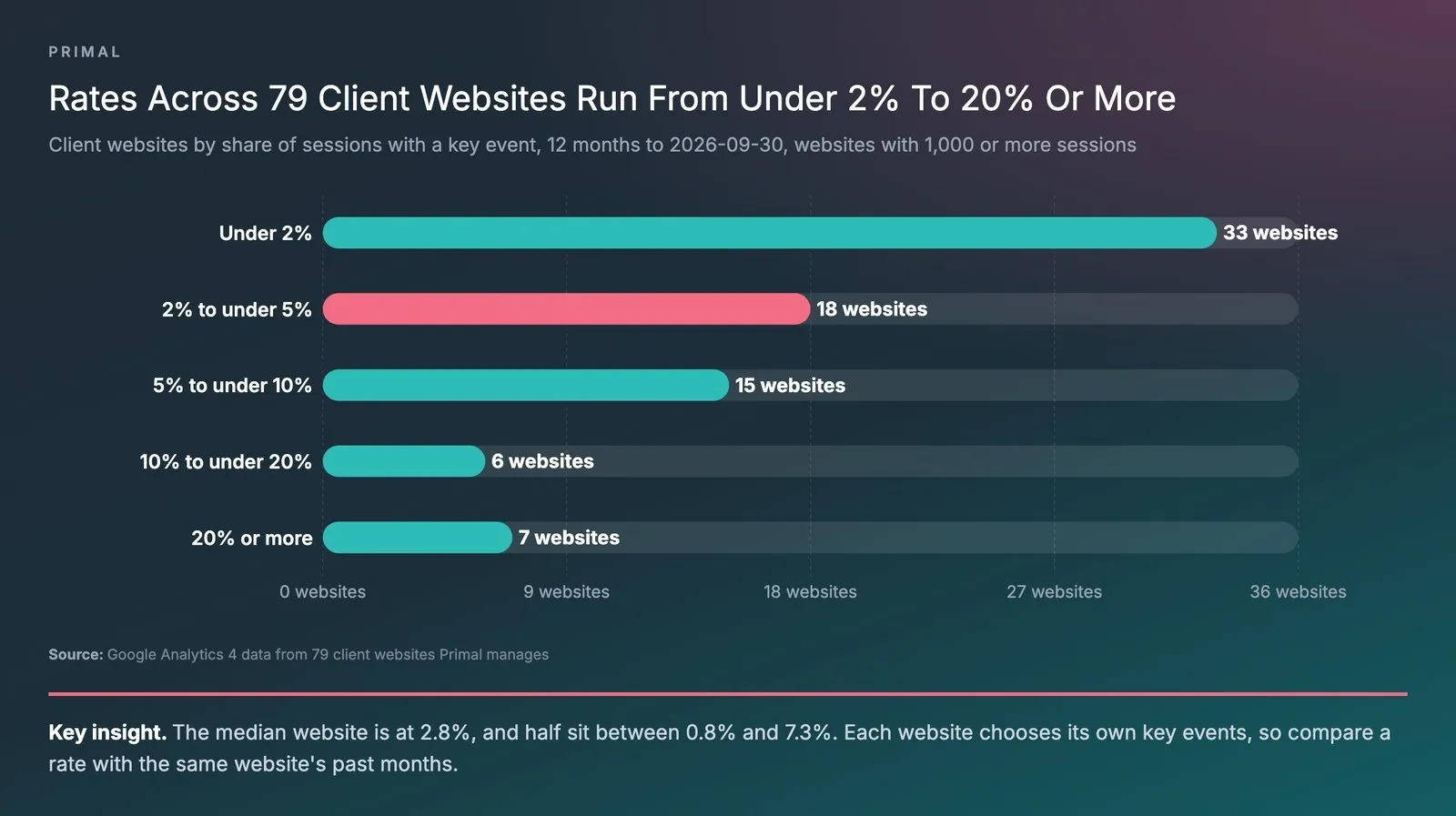
The calculation is simple, but it depends on two choices. The first is which action you record as a conversion. The second is what you divide by. Primal looked at the client websites it manages in Google Analytics 4 (GA4) over the 12 months to 2026-09-30. Across the 79 websites with 1,000 or more sessions, at least 1 key event and a rate of 50% or less, the median website had a key event in 2.8% of its sessions. The median is the website in the middle when they are ranked by rate. Half of the websites were between 0.8% and 7.3%.
Two kinds of website were left out of that figure. Websites with no key event set up were left out because they do not measure any action. Websites where more than half of all sessions had a key event were left out too. A rate that high means an action that happens on almost every visit, such as opening a page, is recorded as a key event.
That second kind shows how much the first choice matters. A website that records only forms, LINE taps and calls shows a lower rate than one that also records long visits and link clicks, even from the same visits. Only the first tells you how many people got in touch. So before you ask whether your rate is good, pick the one conversion that leads to revenue and one number to divide by. Then compare it with your own past months. Once that number is reliable, start testing your pages to raise it.
What Is A Conversion
A conversion is one action that a business has chosen as a goal. Conversion rate is how often that action happens, compared with the number of visits or clicks. Conversions come in two kinds, set by how close they are to revenue.
- Macro conversions lead straight to revenue. Examples are a purchase, a quote request, a phone call and a chat started on your LINE Official Account.
- Micro conversions are the smaller steps before that. Examples are adding a product to the cart, joining an email list, watching a whole video and staying on the site past a set time.
GA4 calls the actions a business marks as goals key events. Google Ads calls them conversion actions. Both let you choose which actions to include. When you add micro conversions to macro ones, the rate goes up, but it tells you less about where revenue comes from.
Each of the 79 client websites above chooses its own key events, and the GA4 data does not show how many were forms, LINE taps or calls. Their rates spread widely. Of the 79, 33 had a key event in under 2% of sessions, 18 in 2% to under 5%, 15 in 5% to under 10%, 6 in 10% to under 20% and 7 in 20% or more. A high rate alone does not tell you whether a website gets more enquiries or records more small steps. The chart below shows the spread.
How To Calculate Conversion Rate
To calculate conversion rate, divide the number of conversions by the number of sessions, users or clicks in the same period. Then multiply by 100 to get a percentage.
Conversion rate (%) = conversions ÷ sessions, users or clicks × 100
As an illustration, say a landing page had 2,000 sessions in a month and 40 people sent its form. Its conversion rate is 40 ÷ 2,000 × 100 = 2%, or 2 forms for every 100 sessions.
Want to see what a higher rate is worth to your business? Put your monthly visitors, your current rate and the value of a customer into our conversion rate optimisation (CRO) calculator. It shows the extra enquiries or orders, and the extra revenue a month and a year.
Divide By Sessions, Users Or Clicks
Choose what to divide by from the question you want to answer. Each choice gives a different rate from the same data.
- Sessions tell you how well each visit works. GA4 calls this the session key event rate. Its dimensions and metrics guide defines it as sessions with a key event divided by all sessions.
- Users tell you whether each person converted. One person may visit several times before they decide, so the rate per user is often higher than the rate per session.
- Clicks tell you how well an ad works. Google Ads works out conversion rate as conversions divided by ad interactions, such as clicks, in the same period.
How you add the numbers up changes the rate too. Across the same 79 client websites over the same 12 months, the median website had a key event in 2.8% of sessions. With the sessions of all 79 added together and divided once, the rate is 8.8%, because a few large websites hold most of the sessions. Two rates worked out from different numbers cannot be compared, even when they come from the same websites in the same months.
How Conversion Rate Changes Your Cost Per Conversion
At the same cost per click, your cost per conversion is the average cost per click divided by the conversion rate. So when the rate doubles, the cost of each conversion halves.
The table below is an illustration. It assumes an ad budget of 40,000 baht and an average of 20 baht a click, which buys 2,000 clicks in every row.
| Conversion rate | Conversions | Cost per conversion |
|---|---|---|
| 1% | 20 | 2,000 baht |
| 2% | 40 | 1,000 baht |
| 4% | 80 | 500 baht |
What Is A Good Conversion Rate
A good conversion rate is one that beats your own past rate for the same conversion, divided by the same number. An average from another source helps only when it records the same action and divides the same way as you do. Check both before you compare.
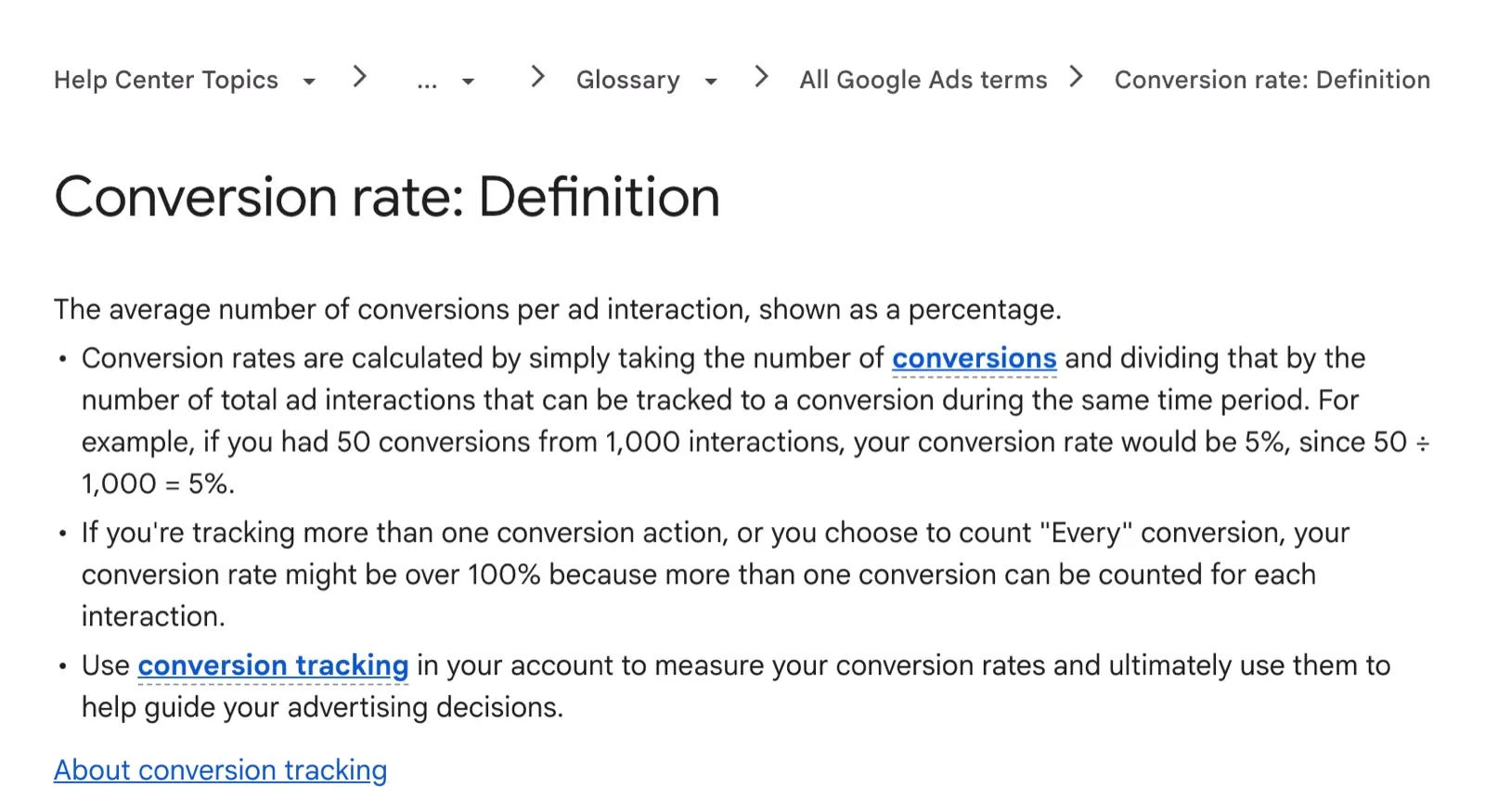
The way conversions are recorded can push a rate far up. Google Ads says its conversion rate can pass 100% when an account tracks more than one conversion action. The same happens when it records every conversion after a click, because one click can then bring more than one conversion. The capture below shows that definition in Google Ads Help.
The client Google Ads accounts in Primal’s data show the same thing. One gets a few conversions for every hundred clicks. Another records more conversions than clicks. Rates like these describe how an account is set up. They do not tell you how many customers it won.
A rate of 6% is good when it beats your own earlier rate, measured the same way. Take 6% of sessions with a purchase and 6% of clicks with any key event. They are different results, and the number alone does not say which one you have.
Set your own baseline in this order.
- Pick one macro conversion as your main number, such as orders for an online store or forms for a service business.
- Look back at least 3 months, split by channel and device. Visitors from ads and from search results often convert at different rates.
- If your business is seasonal, compare with the same months last year, such as the year-end shopping season.
- Set your goal as a rise on that rate, and measure it the same way each month.
Why Google Ads, Meta And GA4 Show Different Numbers
Each platform records conversions in its own way. Google Ads and Meta give their own ads credit for conversions. The conversion has to happen within a set time after someone saw or clicked an ad.
GA4 starts from visits to your website and shares the credit between channels with its own model. So one order can appear in all three, credited to a different channel in each.
Meta says it credits an action off the ad to the ad, such as a purchase on your website. The action has to happen within a set number of days after someone viewed or clicked the ad. Say a person sees a Facebook ad and does not click. Later they search for the brand on Google and buy. Meta and Google Ads can both take credit for that order.
Customers often ask us about this when an ad report shows several times the orders their back office recorded. We see two causes most often. The first is people who saw an ad but never clicked it. The second is two purchase goals in GA4 that record the same order twice.
- Treat your back office or customer relationship management (CRM) system as the true number of orders and customers.
- Check that the same action is not set up as a conversion more than once in one platform.
- Use each platform’s numbers to compare campaigns inside that platform, and do not add numbers from different platforms together.
- Send purchase data from your website straight to the ad platforms, for example through the Meta Pixel. Each platform then records more of them.
How Click-Through Rate Differs From Conversion Rate
Click-through rate (CTR) is the share of people who click an ad or a search result after they see it. Conversion rate is the share who then take your chosen action after the click. Google Ads defines CTR as clicks divided by impressions.
CTR tells you how well the ad gets clicks. Conversion rate tells you how well the page and the offer get people to act.
To continue the illustration above, say the ad was shown 100,000 times and got 2,000 clicks. Its CTR is 2%. If those 2,000 clicks brought 40 conversions, the conversion rate is also 2%, and 100,000 impressions gave 40 conversions.
A high CTR with a low conversion rate often means the ad promises something the page does not show. The fix is a landing page that repeats the ad’s headline and offer. Visitors then see straight away that they are in the right place.
How To Increase Your Conversion Rate
CRO is the work of finding where visitors stop or leave your site, then testing one fix at a time. The aim is more conversions from the visitors you already have, with no rise in the ad budget. Work in this order.
- Check your tracking first. Make sure each macro conversion is recorded once and matches your back office or CRM. If the starting numbers are wrong, every test after them is wrong too.
- Find the step where people leave. Look at the rate for each step of the funnel. For a store, that is product page to cart, cart to checkout and checkout to purchase. Split it by phone and computer, and fix the step with the biggest drop first.
- Watch what people do on that page. Heatmaps show this. A click map shows where people click. A scroll map shows how far down they read, and a hover map shows where the mouse rests. Session recordings with no personal data show where people get stuck.
- Clear what is in the way. Give each page one main call to action. Write the button so it says what happens next, such as “Get a quote”. Ask only for the details your team needs to reply, and show the full cost before the checkout page.
- Run an A/B test on one change. Show two versions of the page to two groups of visitors at the same time. Change only one thing, such as the headline or the button words. Then you know which change made the difference.
- Keep the winner and log every result. Write down each test and what it showed, including the ones that did not work, so the team does not repeat them.
For an online store, start with the cart and the checkout. Baymard Institute puts the average cart abandonment rate at about 70%, across 50 studies. That is the share of online carts left before purchase. In its own survey, 40% of people who had left a purchase gave extra costs, such as shipping, as a reason. Showing the delivery cost on the product page is a good first test.
Mark McDowell, who founded Primal, has suggested two changes of this kind to clients this year. People who arrive from an ad often ask for information before they are ready to talk to anyone. So on some landing pages we offer an information request in place of “speak to an adviser”, and the page then emails them the details. On a site where almost everything is blue, a quote button in a colour that stands out can raise the conversion rate, because people find it more easily. Each is a single change, so it can run as the A/B test in step 5.
A team at Primal can check your tracking and test your pages, forms and checkout. The same team in our Bangkok office plans search engine optimisation (SEO) and advertising. Each test then starts from the campaign data you already have.
Frequently Asked Questions About Conversion Rate
How Do You Calculate Conversion Rate In Excel
Put conversions in one column and sessions or clicks in the next, then divide the first by the second. With conversions in B2 and sessions in C2, type =B2/C2 in D2 and set the cell to the percentage format. Use =IFERROR(B2/C2,0) when some rows have no sessions, so the sheet shows 0 instead of an error.
Customers Often Ask Us What A 20% Increase In Conversion Rate Means
It means the old rate grew by a fifth of itself, so a 2% rate that rises 20% becomes 2.4%. A change from 2% to 22% is a rise of 20 percentage points, which makes the new rate 11 times the old one. Say which kind of rise you mean when you set a goal or read a report.
Customers Often Ask Us Which Number To Watch When Leads Rarely Become Customers
Watch the lead to customer rate, apart from your website’s conversion rate. Record what happened to each lead in your CRM, such as could not reach, not a fit, still deciding or bought. Then look at that rate by channel and campaign.
The channel that brings the most leads may bring fewer customers than another. Send those results back to Google Ads and Meta too, so they look for more people like your real customers.
How Long Should An A/B Test Run
Run it until each version has enough conversions that the gap is unlikely to be chance. Run it for at least 1 full week too, so it covers weekdays and the weekend. A page with few visitors may need several weeks. In that case, test a bigger change, such as the offer or the page layout, instead of a button colour.
Content Writer
Pimlapat Phansuathong is a Content Writer at Primal with over 6 years of writing experience. She writes search engine optimisation (SEO) content, from search intent and keyword research to the structure of each article. She joined Primal in 2022.
About The Author